Team: Matt, Anvita, Uraiba, Myra
Abstract
Gutenberg Technologies (GT) is expanding its suite of AI-powered content creation tools, yet early user testing revealed significant usability challenges that limited users’ ability to discover, understand, and trust these features. As part of a four-person UX research team, I investigated how educational content creators interacted with GT’s “Edit with AI” and “Generate with AI” tools using eye-tracking, task completion studies, and retrospective think-aloud sessions. Across eight participants, we uncovered issues in discoverability, clarity of AI terminology, content comparison, and system trust signals. My contributions centered on insight synthesis, storytelling, and designing key recommendations—such as a consolidated editing menu, simplified AI terminology, and a side-by-side comparison model. This case study highlights how I transformed scattered usability pain points into actionable design improvements that make AI tools more intuitive, reliable, and approachable for users.
The Problem
Gutenberg Technologies (GT) is a platform that enables educational content creators to build, edit, and publish learning materials at scale. As GT expands its suite of AI-assisted authoring tools, the organization aims to help users work faster and more efficiently by integrating AI into everyday editing and content-generation workflows. However, early feedback indicated that many users struggled to find these AI features, understand how they worked, and trust the results they produced.
The overarching problem we aimed to solve was improving the usability, clarity, and discoverability of GT’s AI tools. Specifically, we sought to understand where users were getting confused, what slowed them down, and how the interface could better support confident, efficient use of AI-driven editing and content creation.
Project Goals
- Evaluate the usability and overall user experience of GT’s AI tools.
- Assess the discoverability of AI tools across all AI knowledge levels.
Team
Our team—Matthew Thien, Anvita Shah, Myra Chen, and Uraiba Zafar—worked collaboratively throughout the project, sharing responsibilities rather than having fixed roles. We all contributed to recruiting participants, conducting eye-tracking sessions, synthesizing findings, and developing recommendations. Each team member conducted two eye-tracking studies, ensuring that data collection was balanced and efficient. My work complemented the team by focusing on organizing and synthesizing insights from the sessions, helping to translate our observations into actionable recommendations and clear deliverables for the client. This collaborative approach allowed us to leverage everyone’s strengths and maintain consistency across research and analysis.
My Role
- Recruited participants for the eye-tracking study
- Conducted eye-tracking sessions and facilitated think-aloud protocols
- Synthesized findings from usability observations, eye-tracking metrics, and participant feedback
- Collaborated on identifying key usability issues within the “Edit with AI” feature
- Helped translate insights into clear design recommendations
- Contributed to structuring the final presentation and communicating findings to the client
Challenges & Constraints
One of our biggest constraints was the challenge of recruiting participants who were able to come in person for the eye-tracking sessions. Because eye-tracking required specialized equipment, we were limited to a single lab with fixed availability, which significantly narrowed our scheduling options. Coordinating participant availability with the lab’s open time slots made recruitment more complex and time-sensitive. As a team, we divided outreach, expanded our networks, and communicated constantly to track confirmations and reschedules. By staying organized and supporting each other’s efforts, we were ultimately able to secure eight qualified participants and successfully complete all sessions within our restricted timeframe.
The Process
Our approach to evaluating Gutenberg Technologies’ AI tools was structured yet iterative, combining qualitative and quantitative research methods to uncover user pain points and inform actionable recommendations.
Study Structure
- 8 participants recruited from educational content creators.
- 30-minute sessions including eye-tracking, scenario-based tasks, and a Retrospective Think-Aloud.
- SUS Survey at the end of each study
1. Planning & Preparation:
We began by defining our research objectives and questions, focusing on usability, discoverability, and user confidence in the “Edit with AI” and “Generate with AI” features. We developed a screener survey to ensure participants matched Gutenberg’s target audience, including educators, corporate learning leaders, and users unfamiliar with AI. The team collaboratively drafted tasks, scenarios, and pre- and post-test surveys to capture both initial impressions and reflections after using the AI features.
2. Recruitment & Scheduling:
Recruiting participants posed a challenge because sessions required in-person attendance and alignment with a single lab’s availability. Each participant also needed to fit the target audience criteria. The team divided outreach efforts, tracked schedules carefully, and maintained open communication to ensure we successfully secured eight qualified participants within the available time window.
3. Conducting Eye-Tracking Usability Sessions:
We ran eight 30-minute eye-tracking sessions using Tobi, with each team member facilitating two studies. Participants completed tasks such as editing a paragraph using AI, generating quizzes, and creating interactive learning activities. We captured visual attention metrics, click behavior, and verbalized thought processes using Retrospective Think-Aloud (RTA)methods to gather rich qualitative insights.
4. Analysis & Synthesis:
After each session, the team reviewed heatmaps, gaze plots, and video recordings to identify usability issues, discoverability challenges, and areas of confusion. We collaboratively synthesized findings, combining quantitative metrics (e.g., task completion times, SUS scores) with qualitative observations and participant quotes.
5. Recommendations & Deliverables:
Our insights were translated into actionable recommendations, such as consolidating editing menus, clarifying AI terminology, and introducing side-by-side content comparison. We created client-ready deliverables including annotated mockups, visual summaries, and a slide deck highlighting key findings. These outputs informed GT’s plans to integrate AI tools more seamlessly into their platform.
6. Iterative Feedback & Presentation:
Throughout the project, we held check-ins to refine our methodology, validate insights, and ensure alignment with the client’s goals. The final deliverables included a synthesized research report, a prioritized problem list, and an A/B test plan for future usability improvements.
Key Tasks Studied
- Edit with AI – rewrite and compare climate change content
- Generate with AI (Questions) – build and edit quiz items
- Generate with AI (Activities) – create an interactive learning activity
Key Insights
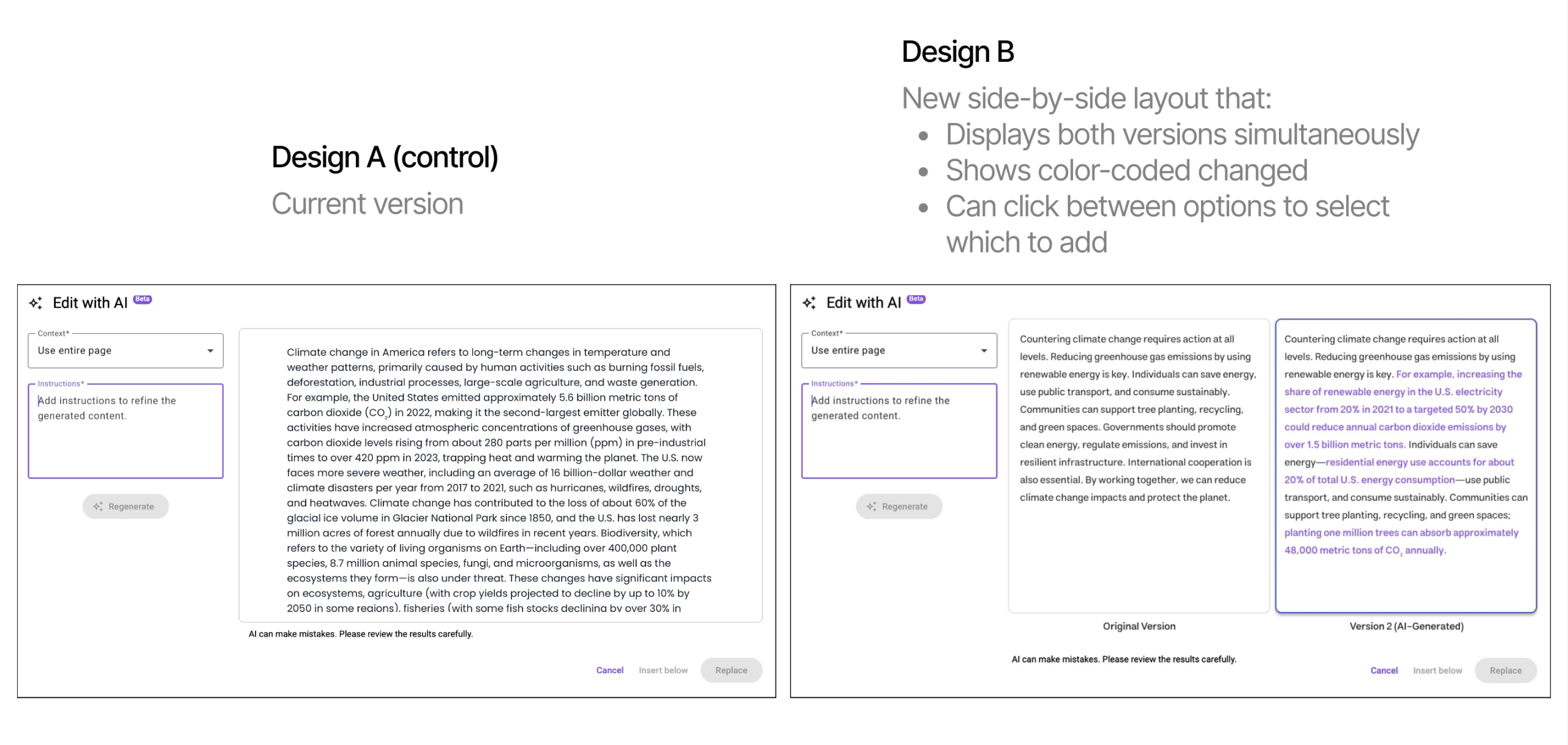
Insight 1: Users Cannot Easily Compare Original vs. AI Content (Severity 4)
Participants struggled to differentiate changes:
- 6/8 could not distinguish AI-generated edits.
- Many reread the entire text repeatedly.
- Users described the process as “mentally taxing.”
Recommendation 1
Side-by-side labeled versions with color-coded changes.
Insight 2: AI Tools Are Hard to Discover (Severity 3)
Users struggled to find both Edit with AI and Generate with AI due to:
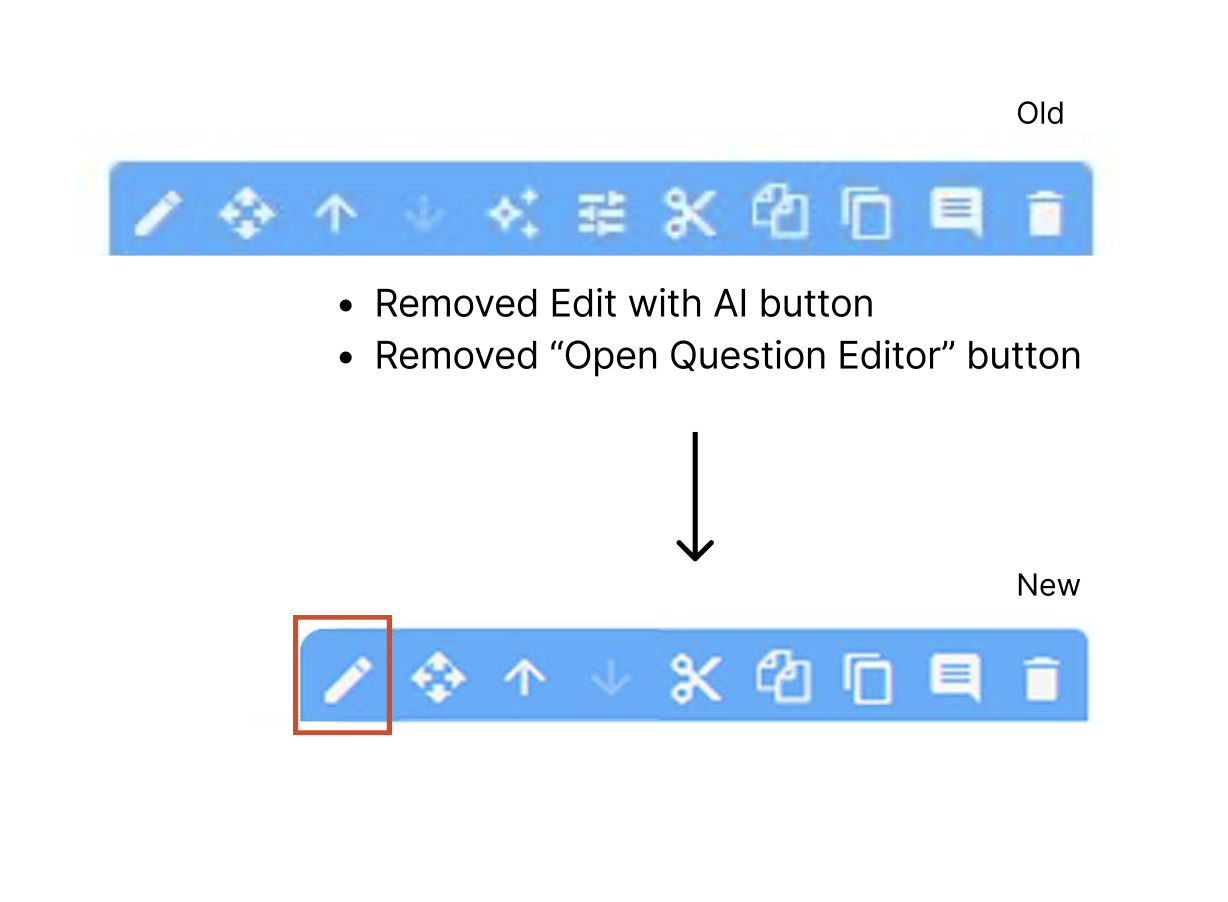
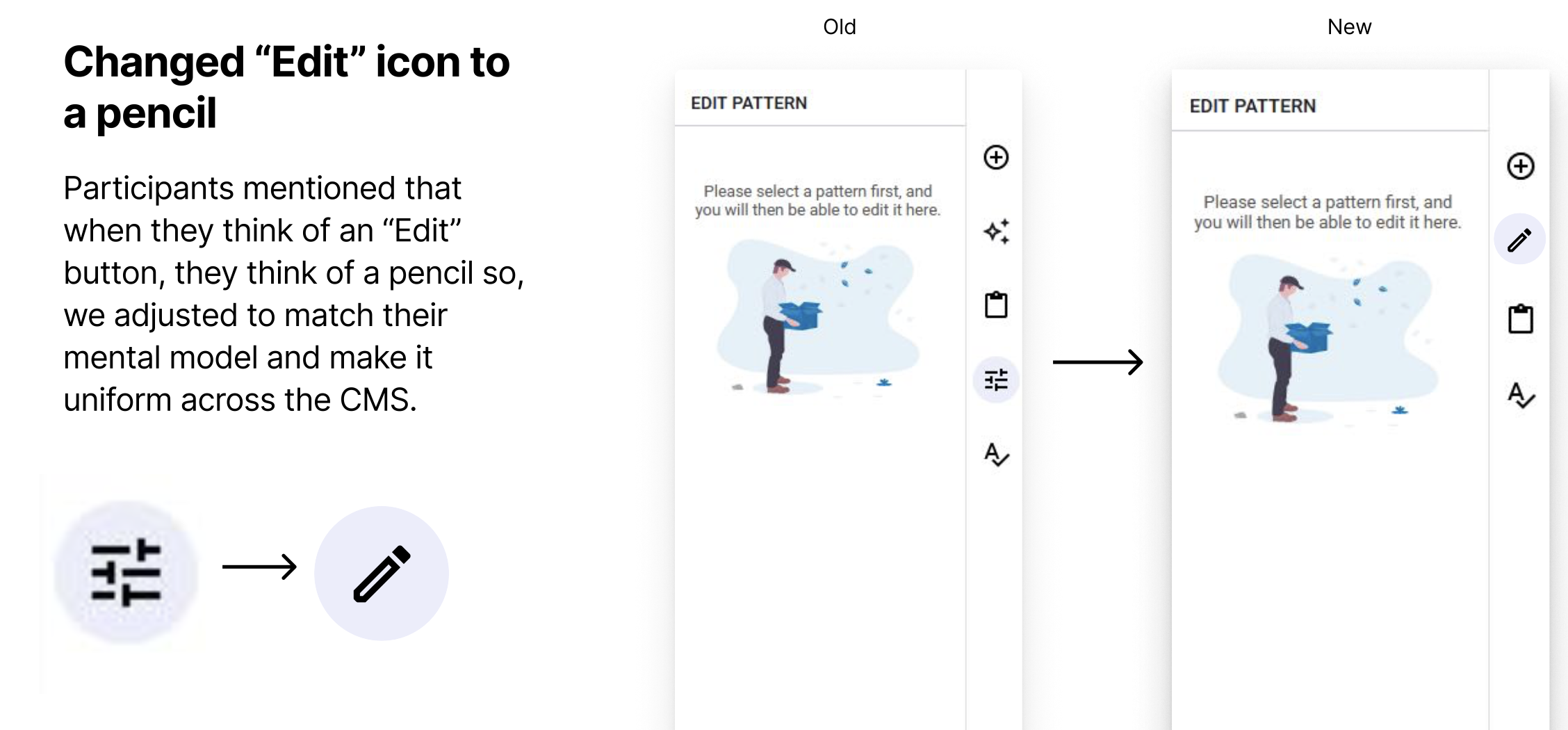
- Too many “Edit” buttons
- Low-information icons
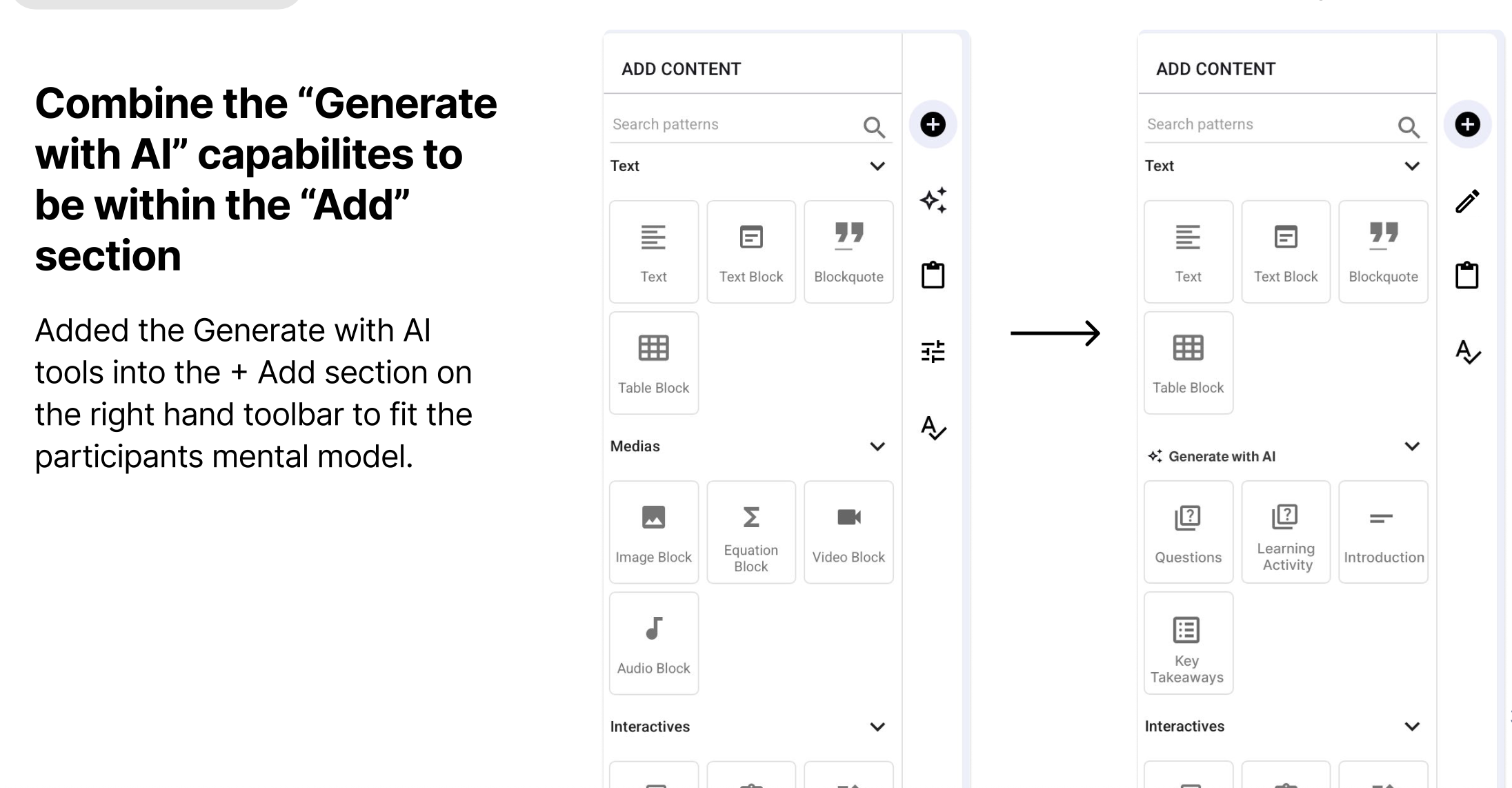
- Tools positioned far from users’ expected locations
Data Points
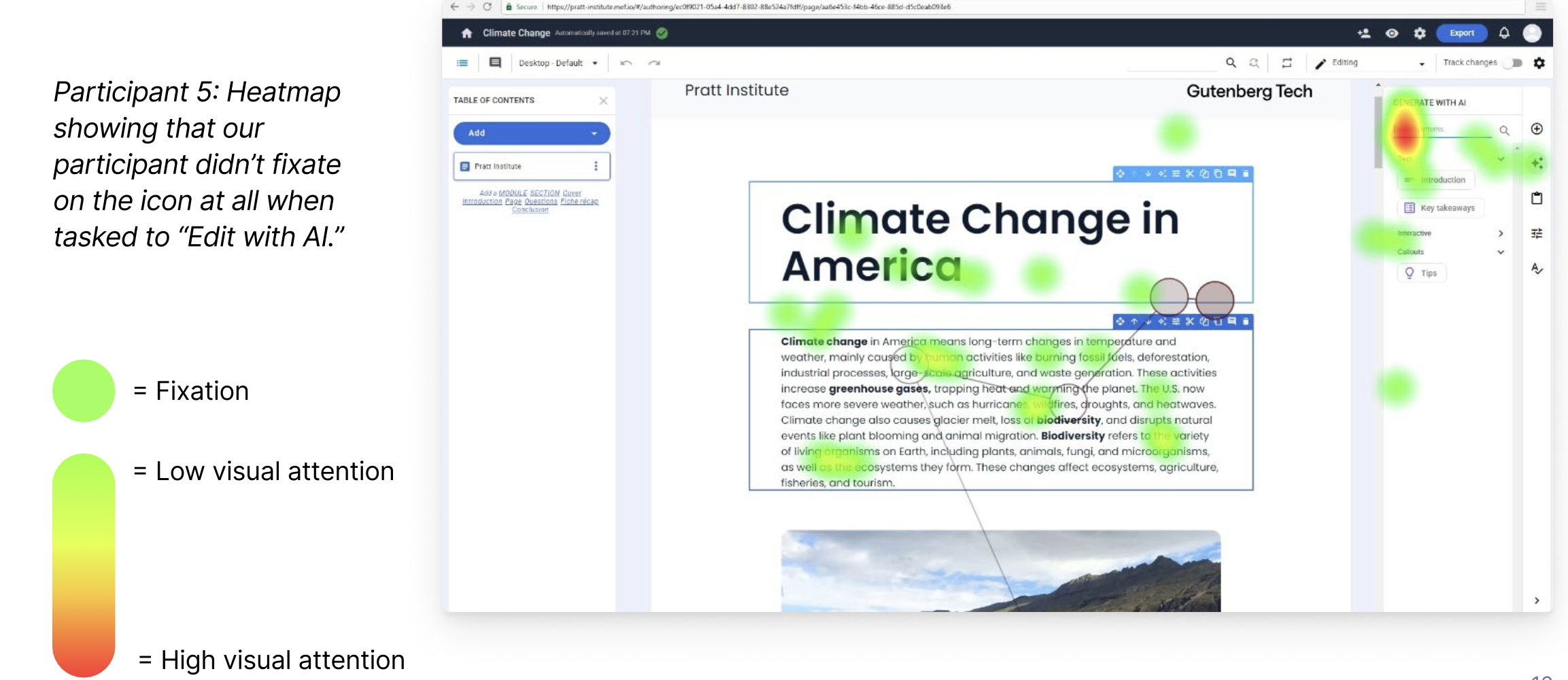
- 7/8 participants found “Edit with AI,” but took 35 seconds on average—too long for a primary action.
- 6/8 used the wrong “Add” panel instead of Generate with AI.
- Heatmaps showed minimal fixation on the sparkle icon.
Recommendation
Consolidate editing tools into a single menu and relocate AI options to match user mental models.
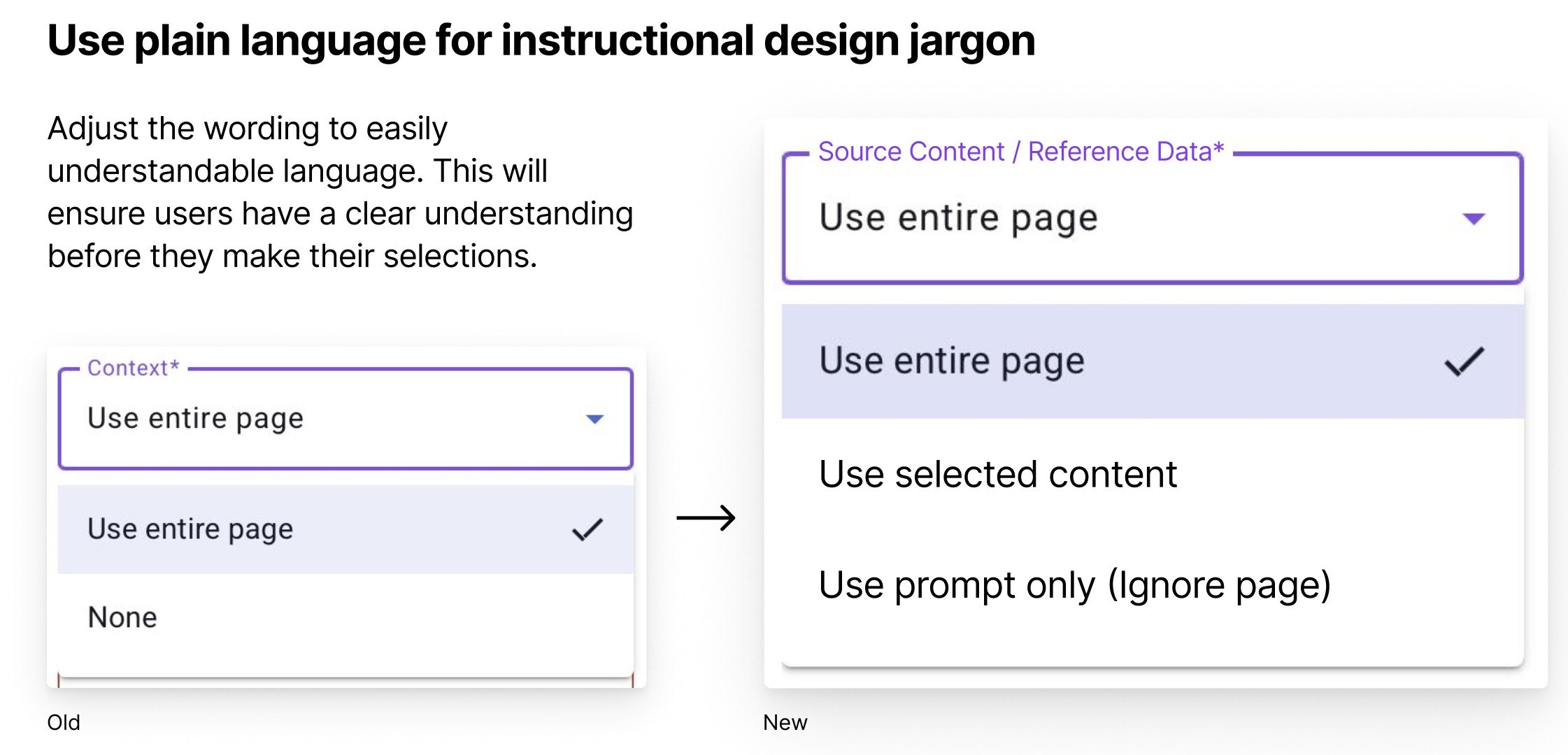
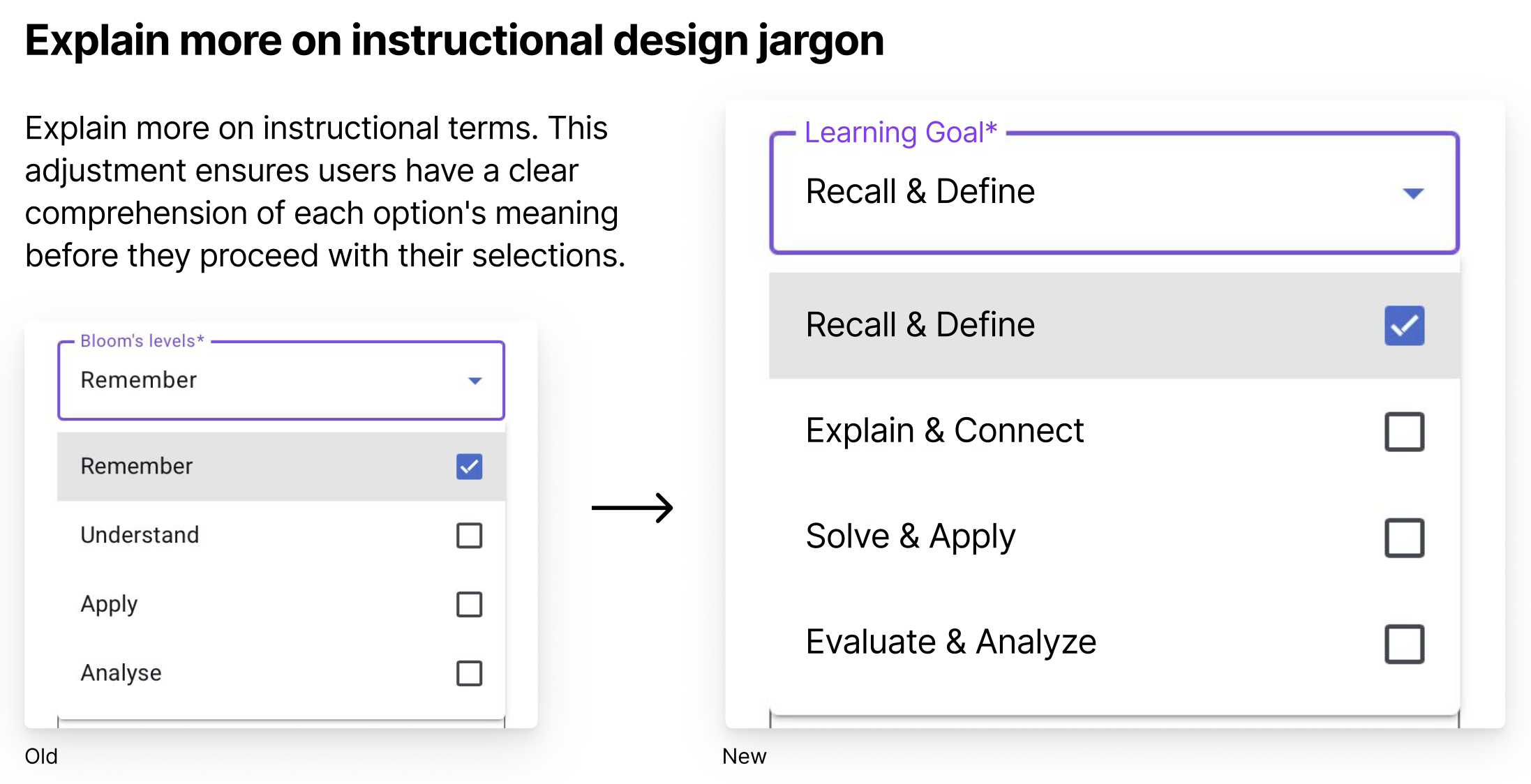
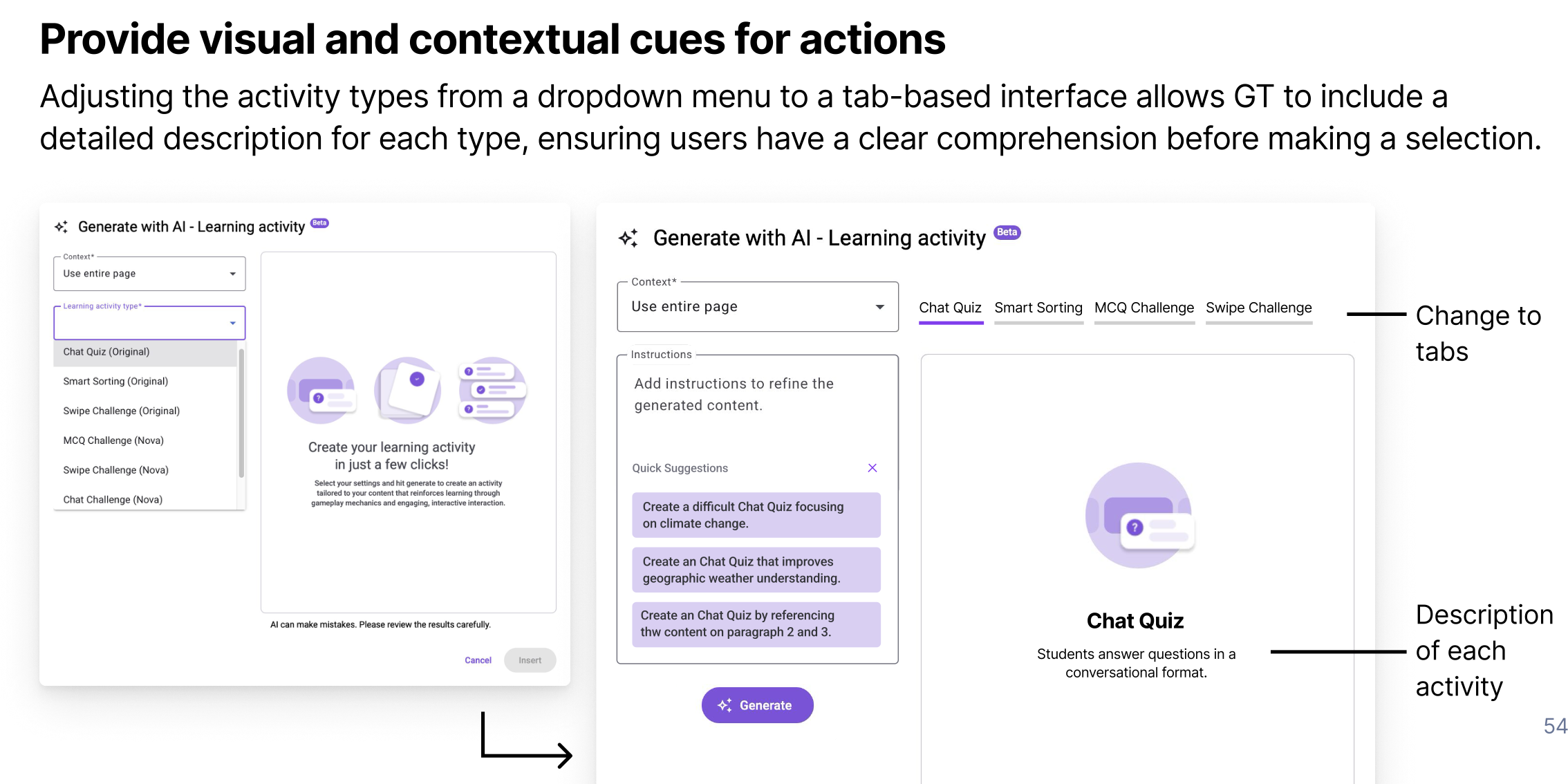
Insight 3: Terminology Confused Users (Severity 3)
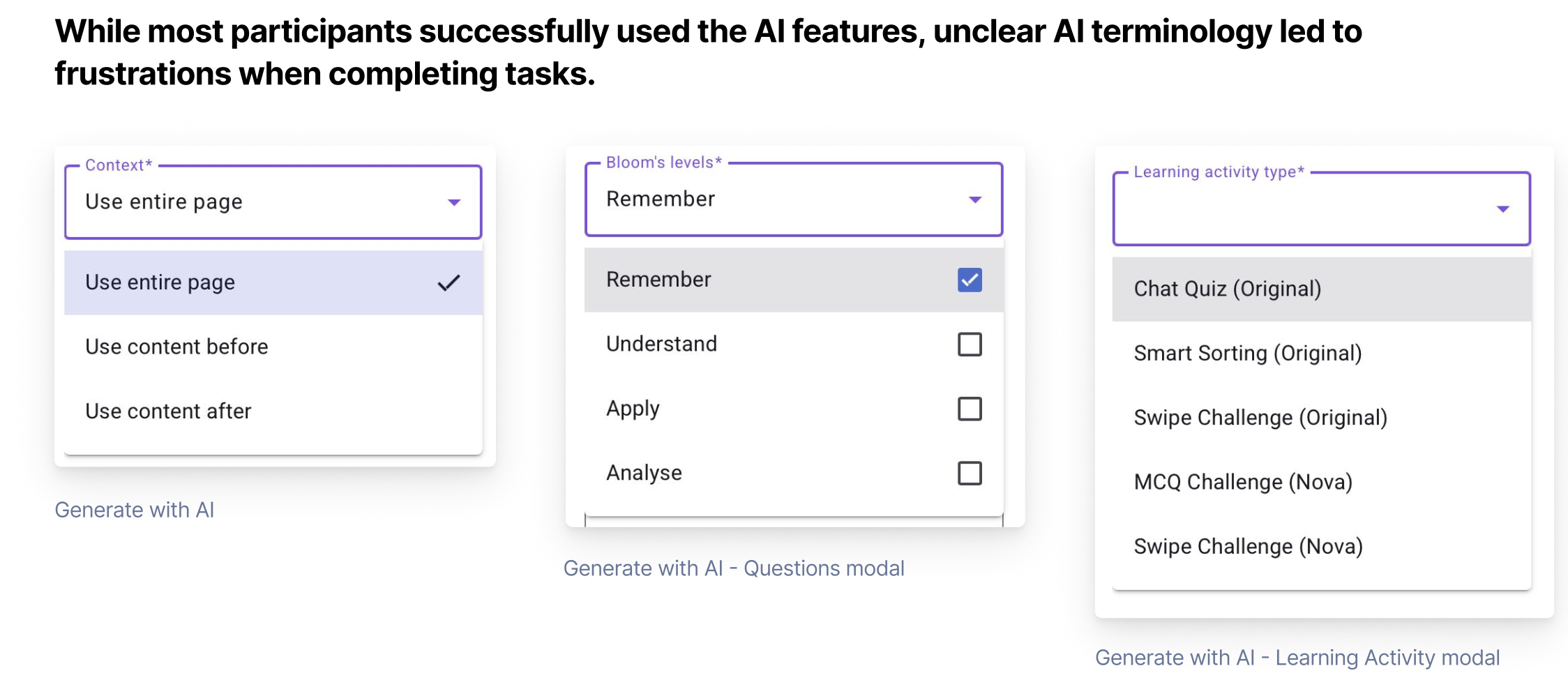
Users did not understand:
- “Context” options
- “Bloom’s levels”
- Learning activity types
These terms created uncertainty and reduced confidence in choice-making.
Recommendation
Simplify jargon, add descriptions, and introduce visual cues via tabs instead of dropdowns.
Conclusion
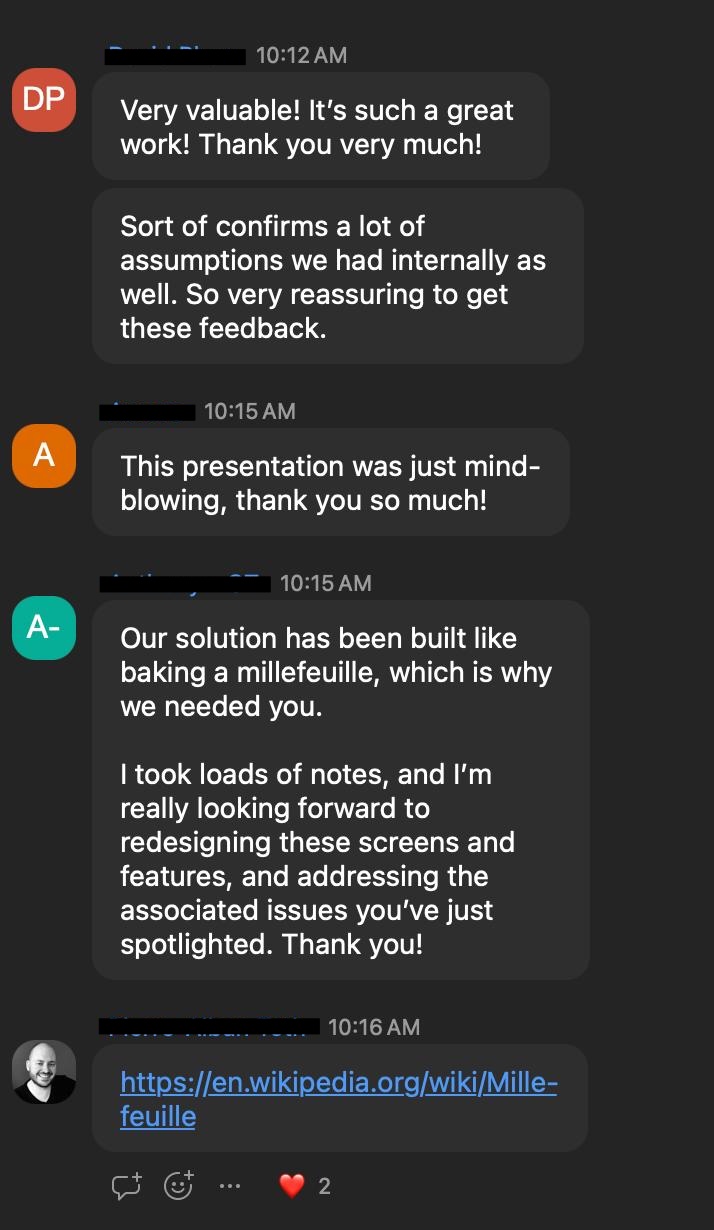
We delivered our findings to Gutenberg Technologies through a comprehensive final presentation and slide deck, including annotated mockups, visual summaries, and embedded user videos highlighting key usability issues. The client’s feedback was overwhelmingly positive: David called the work “very valuable” and reassuring, Aurore described the presentation as “mind-blowing,” and Anthony emphasized that our insights would guide the redesign of screens and features, likening their solution to “baking a millefeuille” that required our research to untangle.
If the project were to continue, next steps could include implementing A/B tests for revised UI elements, tracking long-term adoption of AI features, and expanding the study to additional user groups.
Key lessons from the project include the importance of clear, user-centered labeling and discoverability, the value of combining quantitative and qualitative methods like eye-tracking and think-aloud protocols, and the impact of collaborative teamwork in recruiting participants, conducting sessions, and synthesizing actionable insights. Overall, the project reinforced how targeted research can directly inform design decisions and enhance user trust in complex tools.