Chat With Claude: Natural Language as Interface
The Claude mobile app is a conversational AI chat application that allows users to interact with Claude, an AI assistant, on their phones using natural language. Users can ask Claude questions, have conversations, or get help with writing, analysis, and coding. Users do all this through natural language input via text or voice, and by uploading files and images.
How Conversational Interfaces Reshape Human-Centered Design
In the book The Design of Everyday Things, the author Don Norman describes human-centered design as “an approach that puts human needs, capabilities, and behavior first, then designs to accommodate those needs, capabilities, and ways of behaving” (p. 8). AI chatbots are uniquely positioned to fulfill this set of goals. In leveraging the most natural interface for humans, language, conversational AI such as Claude have the potential to effectively bridge what Norman calls the “Gulf of Execution”, the gap between a user’s intention and their ability to actually get the interface to do what they want it to do. Claude adapts to how each user communicates, and can respond well to the user’s intent, even when phrased poorly. Rather than requiring the user to use rigid and complicated interfaces with long menus, confusing icons, and hard-to-master processes, Claude’s use of human language meets the user’s needs in a highly effective and natural way.
Claude’s designers have made its interface simple and easy to use, with all the UI elements built around affording natural conversation between the user and Claude. However, this simplicity also introduces its own unique design challenges. When an interface feels human, but is actually just a computer, how do designers signal its capabilities and constraints? By examining the Claude mobile app home screen through Don Norman’s framework, we can identify the successes and difficulties of designing for natural language conversation.
Initiating Conversation: Discoverability & Invitation
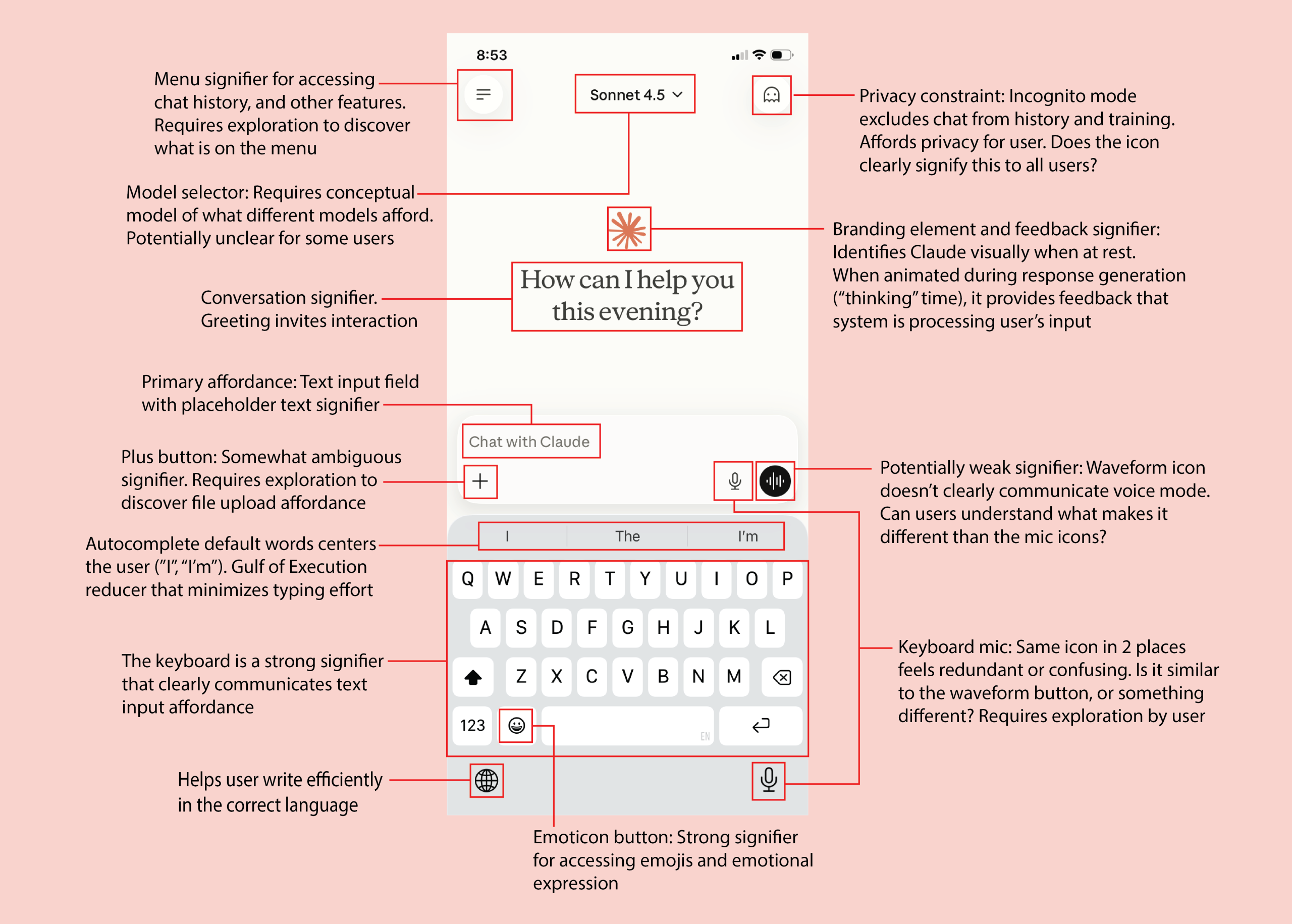
The first thing the user likely notices when they open Claude is the orange star Claude logo, a branding element that reinforces the conceptual model of conversing with this specific AI assistant. Animating the logo while Claude is thinking is a subtle but important design decision that provides feedback to the user that their input was received and a response is being generated.
Below the logo sits a large, friendly greeting centered prominently in the middle of the screen. This invitation starts the conversation with the user. The greeting reads: “How can I help you this evening” (the greeting adapts to the time of day). This conversational signifier invites interaction while signaling that Claude will provide friendly, helpful assistance.
Centered below the greeting, around the middle of the screen, is a text field with light grey placeholder text that reads “Chat with Claude”. This acts as both a signifier for where the conversational input occurs, and another invitation to engage. The visual hierarchy is clear: the colorful logo and large, centered greeting draw attention first, then the user’s eye naturally looks downward, discovering the input field. This mirrors how real conversations flow, from greeting to response, in a well-mapped visual design.
Input Affordances: Gulf of Execution
The UI input elements (the text field, “+” button, audio and waveform icons, and the keyboard) address “Gulf of Execution” and help the user efficiently accomplish the task of communicating with Claude through language. These elements are strategically grouped together at the bottom of the screen, following the Gestalt principles of grouping and proximity to signal their related function (all are ways to communicate with Claude).
The keyboard takes up the bottom third of the screen. The keyboard’s size is a strong signifier of importance, and communicates that text input is the primary way to talk to Claude. The keyboard reduces the “Gulf of Execution”, allowing the user to efficiently input their intent. The carefully chosen, default autocomplete words (including “I” and “I’m”) at the top of the keyboard center the user’s importance and invite the user to begin their text input. The autocomplete feature also reduces the “Gulf of Execution” by minimizing typing effort which allows communication to start.
The “+” button is another signifier that affords input. At first glance, it’s exact purpose is somewhat ambiguous and requires exploration to discover what can be input, but users will discover quickly (with one tap) that it affords file and image uploads, as well as conversational style preferences and toggles for web search, research and health modes. Additional icons might make the affordance clearer, but would clutter the screen, so the “+” button is a good compromise which most users will quickly learn.
The interface also includes two mic icons, and a waveform icon. The two mic icons effectively communicate audio or voice interaction, but having the mic icon appear twice (one above the keyboard, and one at the bottom) feels redundant, potentially creating confusion. The waveform icon is a potentially weak signifier. Without prior knowledge or exploration, it is not clear how this option differs from the mic icon, creating uncertainty about the conceptual model of voice interaction. This ambiguity increases the “Gulf of Execution” rather than reducing it. However, once users try it, they’ll quickly understand how it differs from basic voice input. The design might be improved if one of the mic icons was removed, and the waveform icon was revised to reflect its function of opening a two-way voice chat different from audio input in the regular text chat.
Interaction: Models and Constraints
Claude’s interface includes configuration elements that reveal design challenges unique to conversational AI. The model selector dropdown at the top center of the screen is potentially confusing since the average user may not understand what the different models afford. For example, what does “Sonnet 4.5” really mean? Does it write sonnets? This requires “knowledge in the head” rather than “knowledge in the world”, creating a barrier to understanding. I would be interested to do user research to learn about how users perceive the models’ names, and to explore how the models’ differences could be better explained.
The incognito mode icon serves as a privacy constraint, excluding chats from history and training. The incognito icon, which looks like a Pacman ghost, may not initially signify this function to all users, but with just one click a message appears that explains the mode, clarifying its purpose to users.
Lastly, a slightly revised version of the classic hamburger menu icon at the top left of the screen leverages cultural constraints by using a highly recognizable convention used in many other apps that users will likely understand immediately.
Conversational Design Successes and Challenges
The Claude mobile app interface demonstrates both the promise and challenges of conversational AI design. By using natural language, the app reduces barriers between user intent and execution with strong signifiers, clear feedback, and thoughtful affordances. However, even the most simple and effortless interface can contain ambiguous elements which may require additional effort by the user to understand. The balance between natural conversation and clear system communication is a design challenge Claude’s designers have largely met in their excellent design, though some elements could still be further refined.