Google Maps is one of the most widely used navigation apps in the market. With over an 80% share of the mobile mapping market, almost every smartphone user is familiar with it. While the app provides diverse features addressing varying user needs, this article focuses on an evaluation of the Street View feature in particular.
Street View: What works well
The Street View feature on Google Maps provides users with a 360-degree, street-level imagery that can be explored virtually. This leverages the conceptual model of exploring streets on foot.
The feature has limited discoverability on the main Google Maps Interface. Street View is discoverable through a small preview window with a 360º indication that appears only when a user taps on a place or location. To enter into street view, the user must rely on familiarity rather than strong visual cues.
Once entered, it uses natural mapping to mirror real-world movement, using both touch and drag interactions and on-screen directional arrows as navigational conventions. The arrows afford movement, while simultaneously serving as clear signifiers. When tapped or dragged, there is immediate feedback as the user either moves or rotates in the intended direction, narrowing the Gulf of Evaluation.
Street View also uses clear signifiers like thematic icons for nearby locations, and continuously displayed street names that update with movement to show the user’s current location. The subtle motion of the icons affords interaction, providing users with additional details when tapped on. This interaction relies on mapping conventions, which is consistent with the user’s mental model of Google Maps, where icons indicate places of interest.
Street View applies constraints by providing the user with limited options of movement based on the mapping. The directional arrows shift and include more options only at road intersections, reducing cognitive load. Double tapping the screen allows users to move faster, but there is no visible signifier for this action. It requires Knowledge in the Head to execute and thus creates a Gulf of Execution.
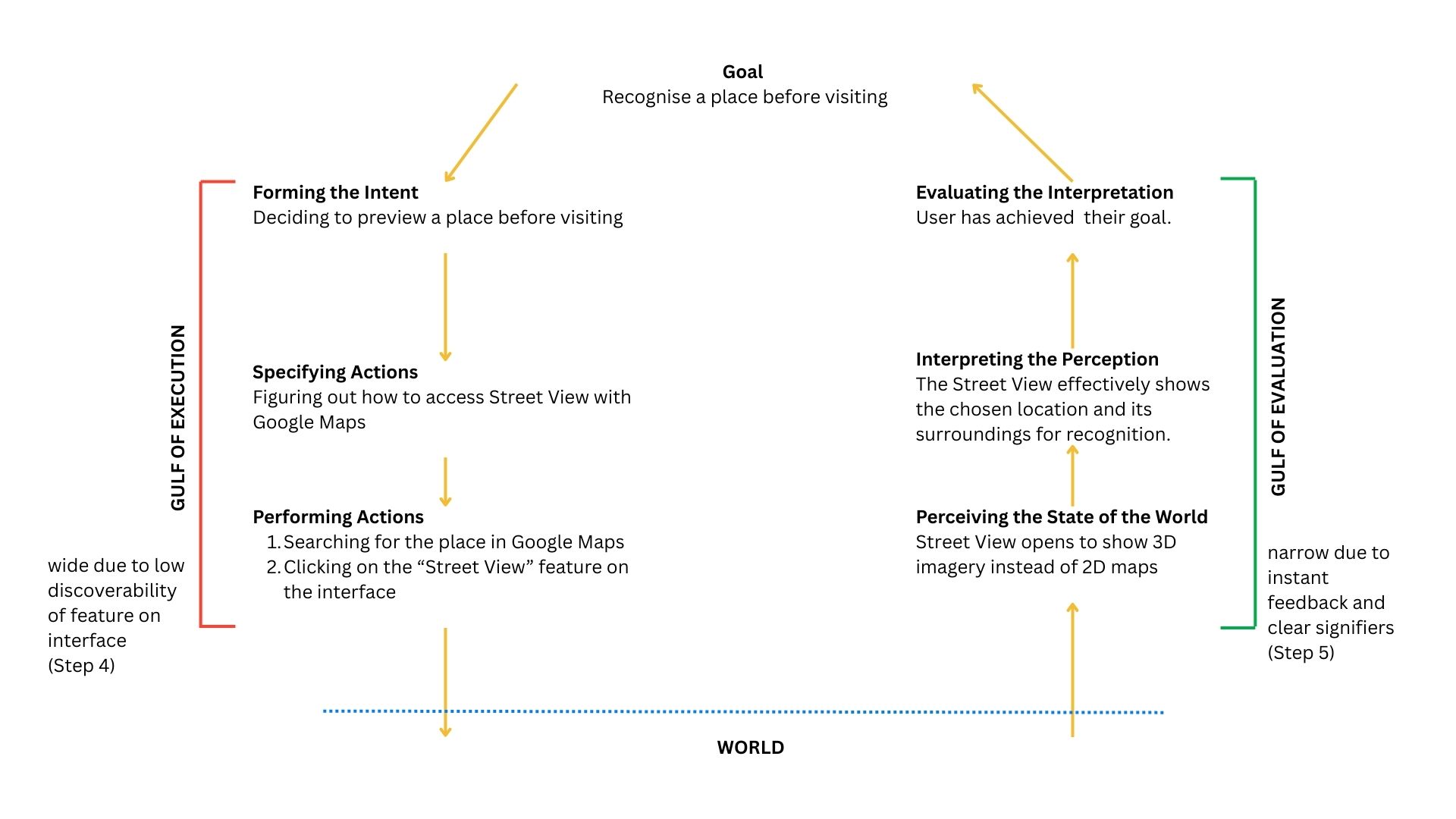
7 Stages of Execution – Using the Street View Feature
Navigation with Street View: Where it lacks
Have you ever reached your destination and walked right past it? One of the primary purposes of the Street View is to allow users to preview a destination before visiting to see what a building or area looks like. While the design intent is clear, the feature lacks effective execution and creates a wide Gulf of Execution.
When navigating, Google Maps does not integrate Street View directly, causing the users to do one of the following:
- Enter Immersive View: It is accessible in the same position as the Street View preview window but indicated with a different icon. The visual similarities can cause a description-similarity slip, where users mistake one feature for another.
- Enter Step Preview with Split Screen: Users can view Street View along with navigation steps. This causes an increase in cognitive load as the user’s attention is divided. On reaching the destination, the Street View does not emphasize or provide visual cues to confirm the destination, further widening the Gulf of Execution.
Design Recommendations: What can be done
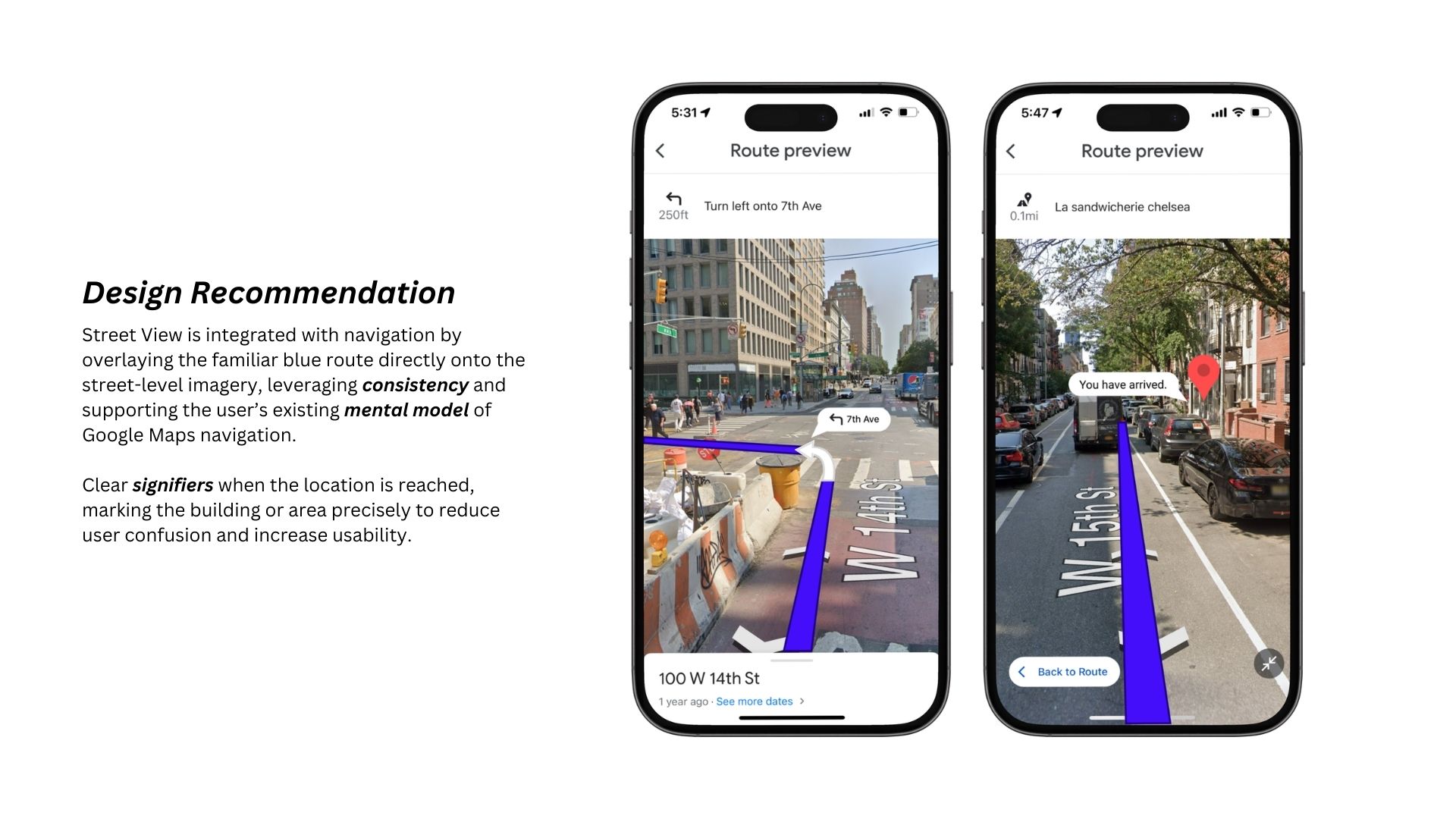
Maintaining consistency in design, Street View can be integrated with the navigation process by merging it into a single screen that aligns with the user’s mental model of Google Maps’ location-based tracking.
Conclusion
Google Maps provides an intuitive user experience with clear signifiers, natural mapping and effective feedback. Maintaining strong design consistency within navigating via the Street View feature can improve experience for users, as shown in the design recommendation above.