This case study explores the following problem statement:
How might we improve the Wikipedia Android app’s reading and search experience to be fully accessible for users with disabilities while meeting WCAG 2.1/2.2 compliance standards?
Our team consisted of Thalia Richter, Tracy Khiew, Rohini Raj, Annie Huang, and Youyuan Wang. We focused on assessing the reading and search experience in the Wikipedia app. This involved nine functionalities:
- Article search functionality
- Offline reading capabilities
- Search results and filtering
- Image viewing / galleries
- Opening articles in new tabs
- Media playback
- Article reading interface
- In-article navigation
- Language selection and switching
My Role
I conducted background research into motor/mobility disabilities. I completed the audit on the article search functionality and opening new tabs. I also audited WCAG guidelines pertaining to external keyboards, contrast, and DP size in all of the other functionalities.
The Process
The first step in our process was to conduct research into different disabilities. There are five major categories of disabilities: visual, auditory, motor/mobility, cognitive, and temporary situational. Since we had five group members, we each researched one category. From here, we began to have a picture of the kinds of disabilities that would most impact a Wikipedia user, as well as the most common disabilities that would impact the largest number of users. We decided to focus on ADHD, arthritis, low vision, and deafness.
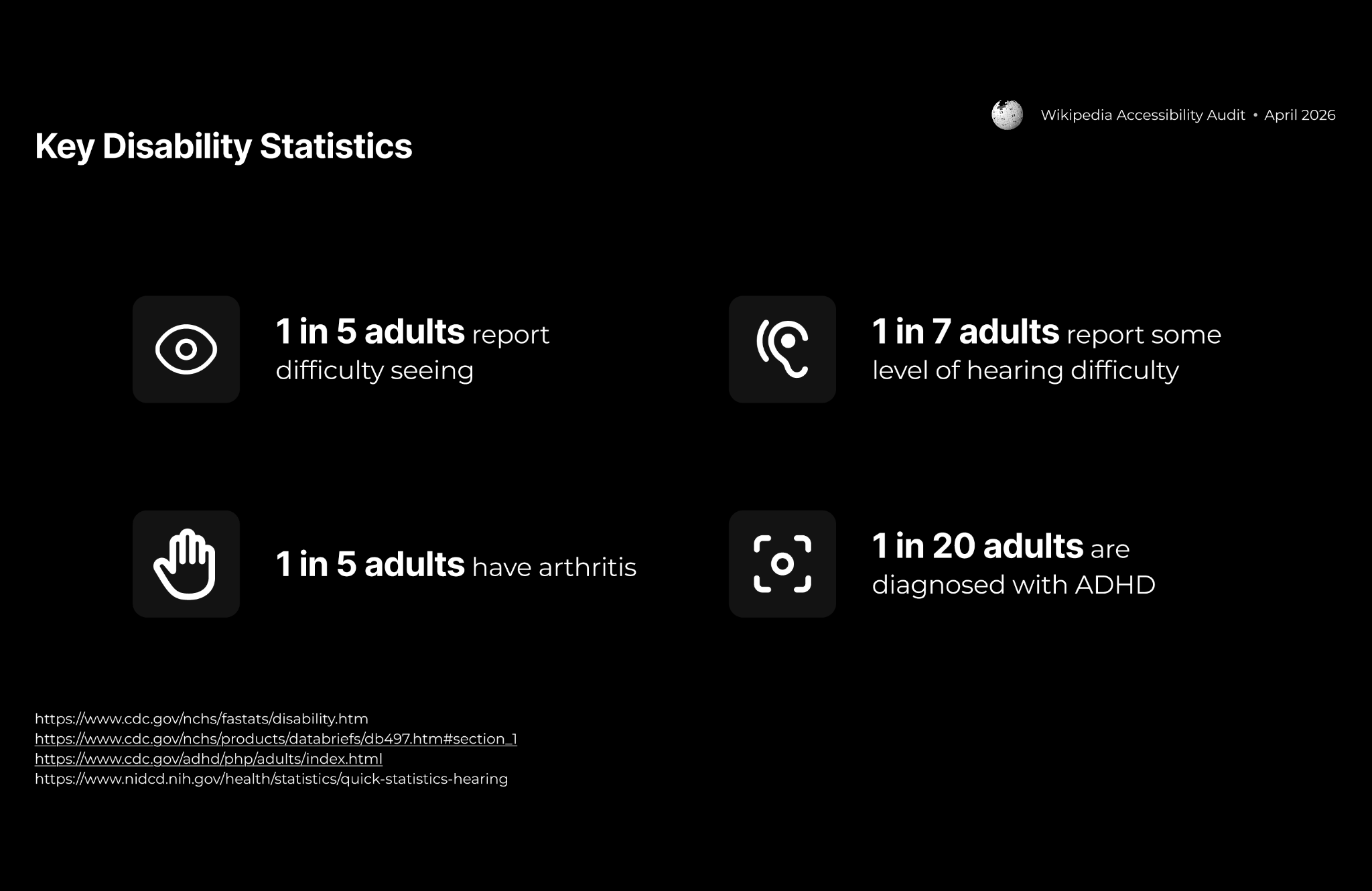
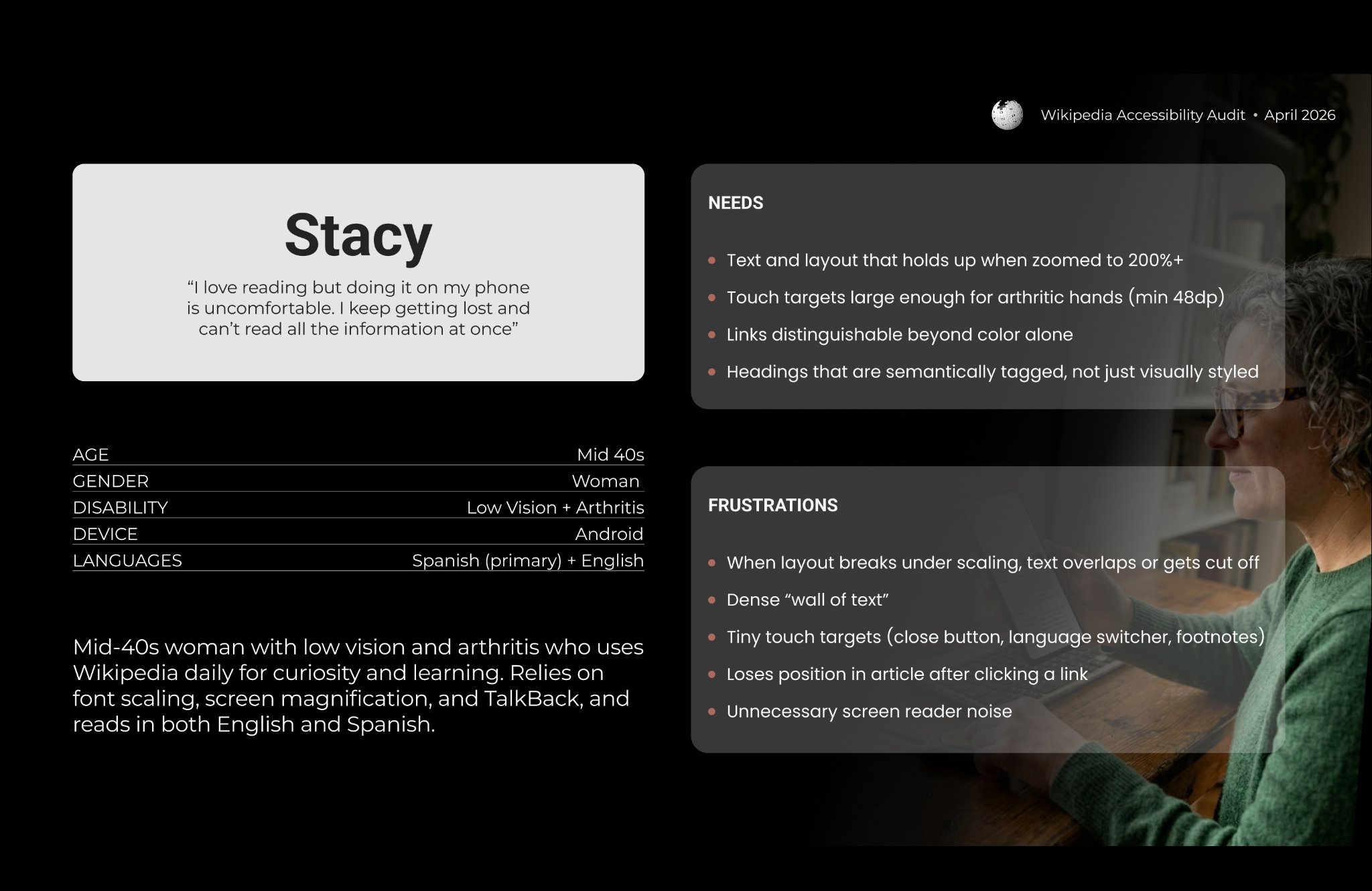
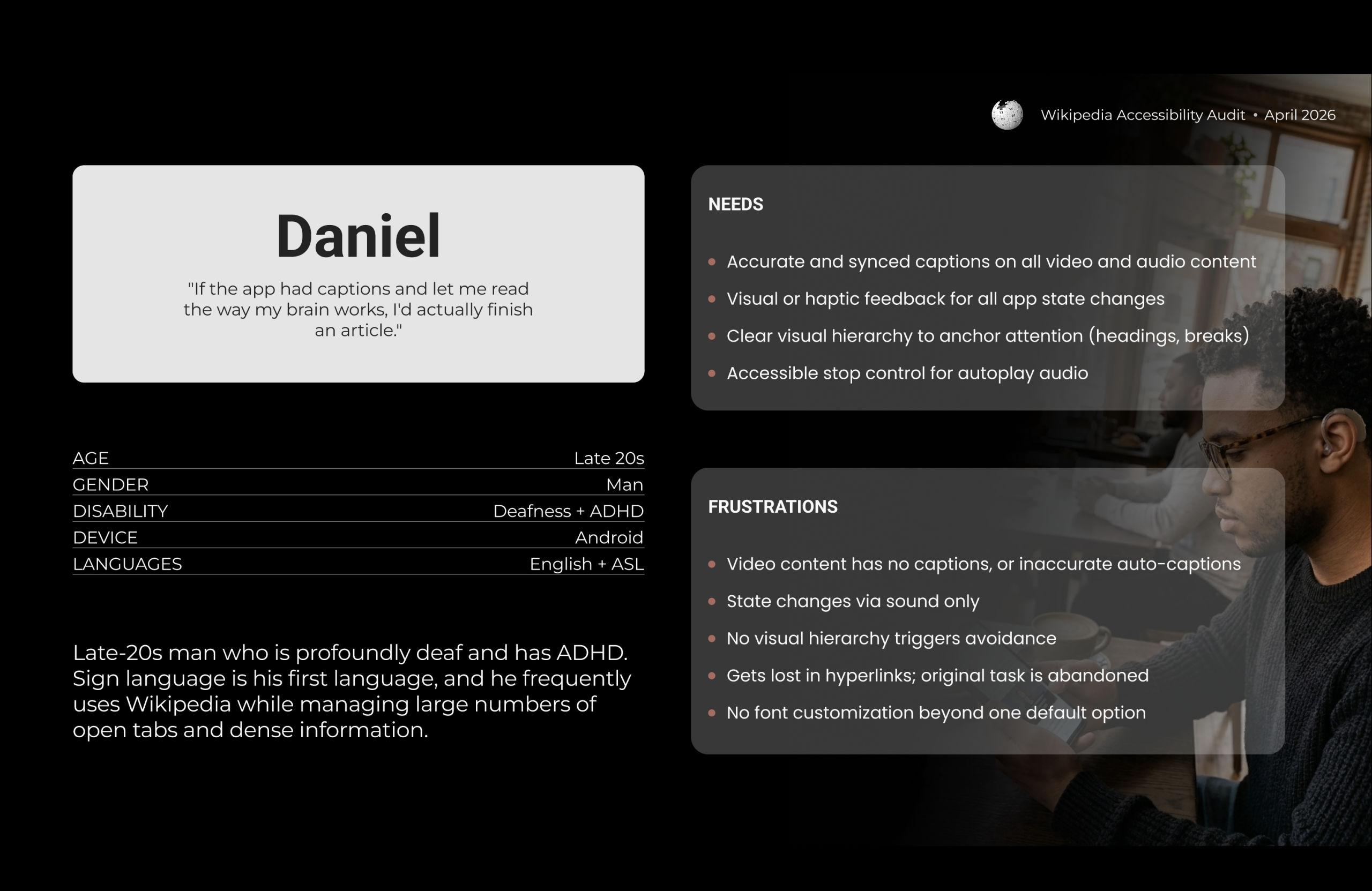
When building our personas, we also incorporated research into common needs and barriers to access among users with these disabilities. Below are our two personas: Daniel, who is profoundly deaf and has ADHD, and Stacy, who has low vision and arthritis.
Evaluation Standards
We evaluated the Wikipedia app using the Web Content Accessibility Guidelines (WCAG) 2.1/2.2. We also evaluated the app using the Material Design 3 (M3) Guidelines. We used a tiered system to categorize the severity of finding. Tier 1 findings violated WCAG Level A and/or were critical or urgent. Tier 2 findings violated WCAG Level AA and/or were important, but more medium term. Tier 3 findings were enhancements to the experience, but could be long term.
Findings
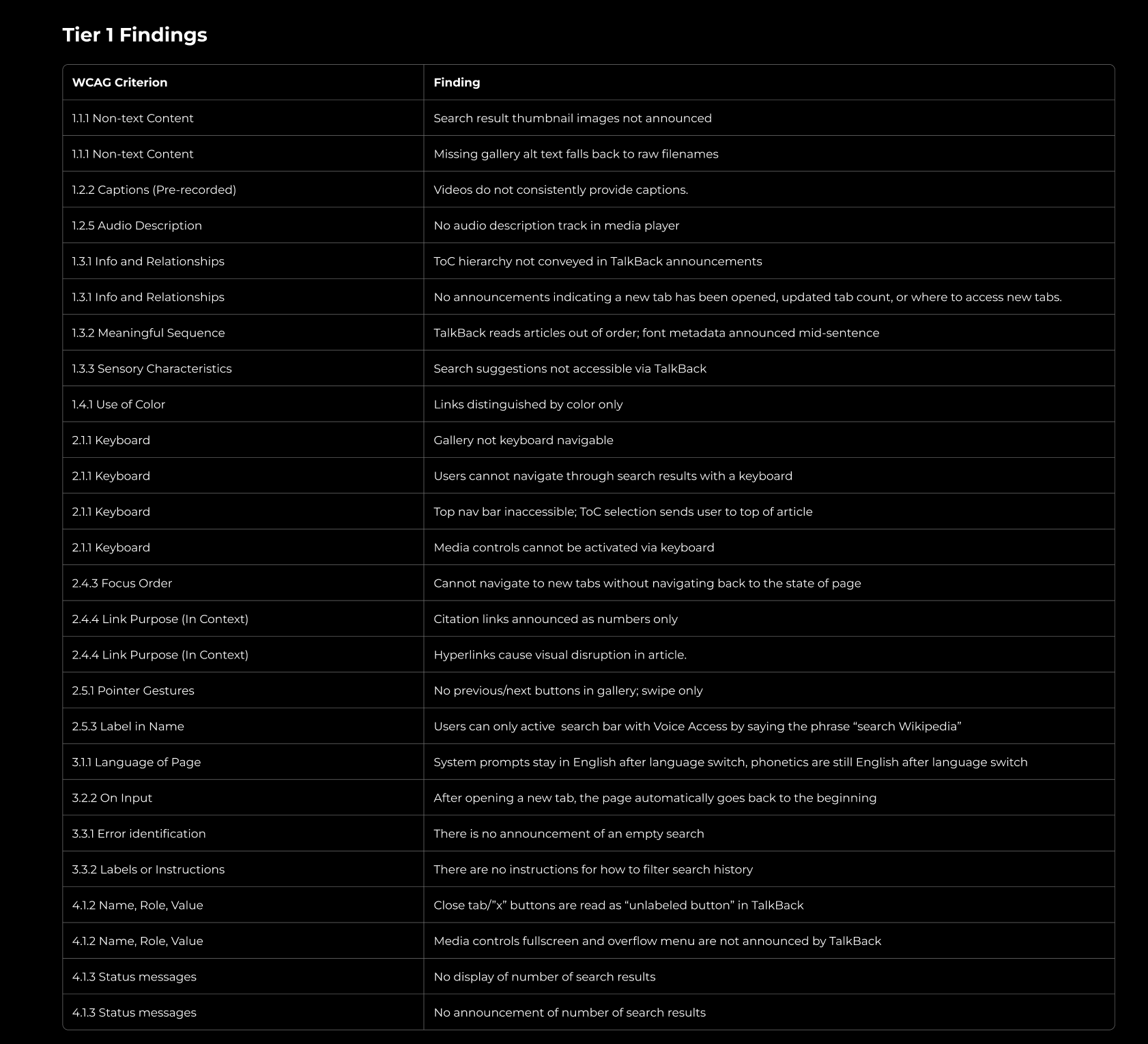
We found 26 Tier 1 failures, 6 Tier 2 Failures, and 3 Tier 3 failures. We bundled these failures into experience issues. These centered on functions that would be most key to the reading and search experience. A full list of all of our findings by tier is listed at the end.
Finding #1: Inaccessible images and videos
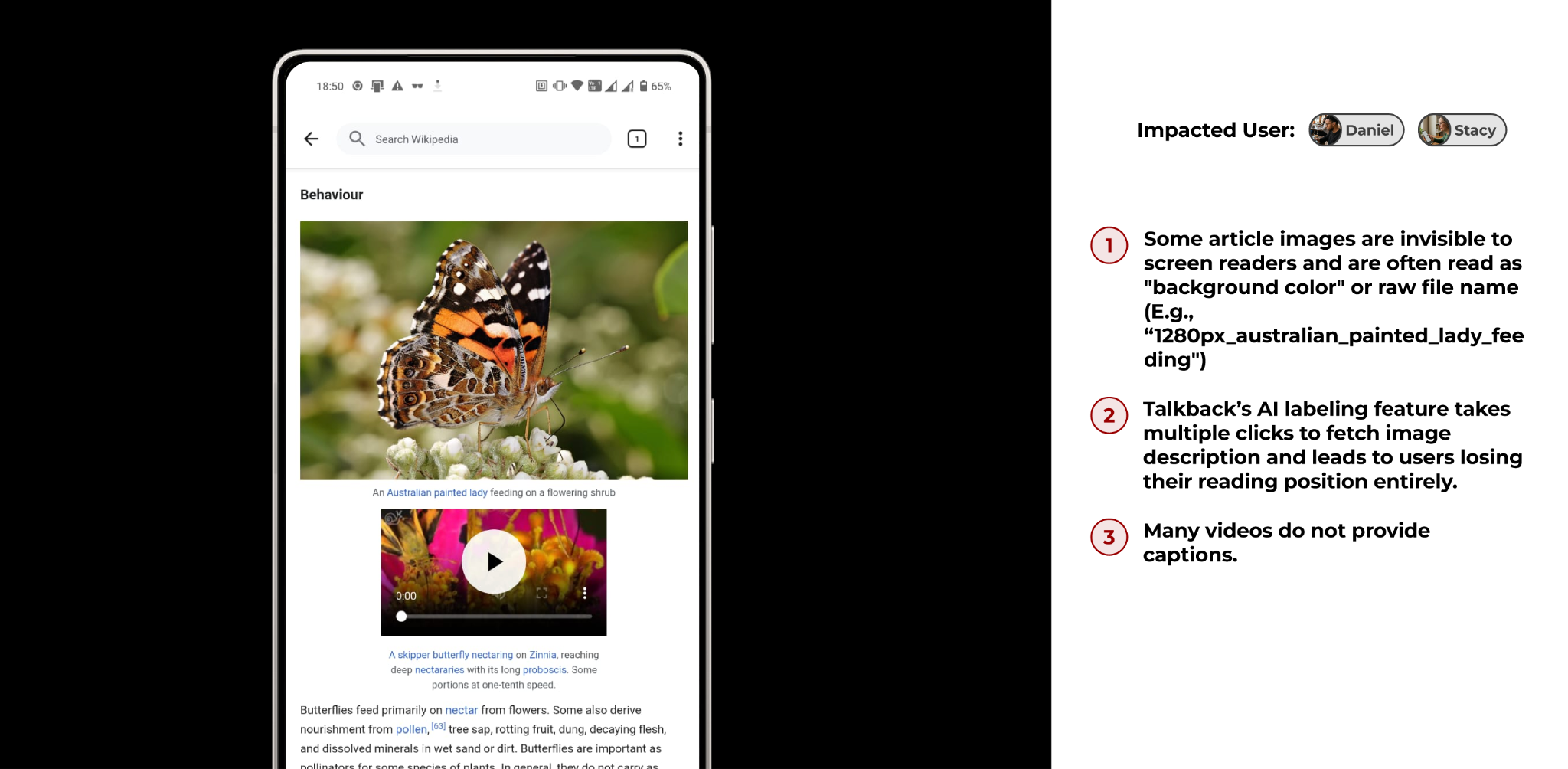
- Some images are invisible to screen readers.
- Violates WCAG 1.1.1 Non-text Content and M3 guidelines to provide fallback text for images with no available description.
- If a user with low vision wants a description of this image, they can try Talkback’s AI labeling feature. However, using this feature on the Wikipedia app takes multiple clicks to fetch an image description and leads to users losing their reading position entirely.
- Violates WCAG 3.2.1 On Focus and M3 guidelines to follow a semantic image labeling pattern.
- Finally, many videos which have audio tracks do not provide captions.
- Violates WCAG 1.2.2 Captions (Pre-recorded) and M3 guidelines to provide captions for video content.
Recommendations
- When alt text is missing: announce “Image, no description available” or use existing caption as description text.
- Use contentDescription attribute for all images.
- Provide synchronized closed captions when videos contain speech or important audio, or indicate when videos are audio-free
Finding #2: Broken Tab Management Experience
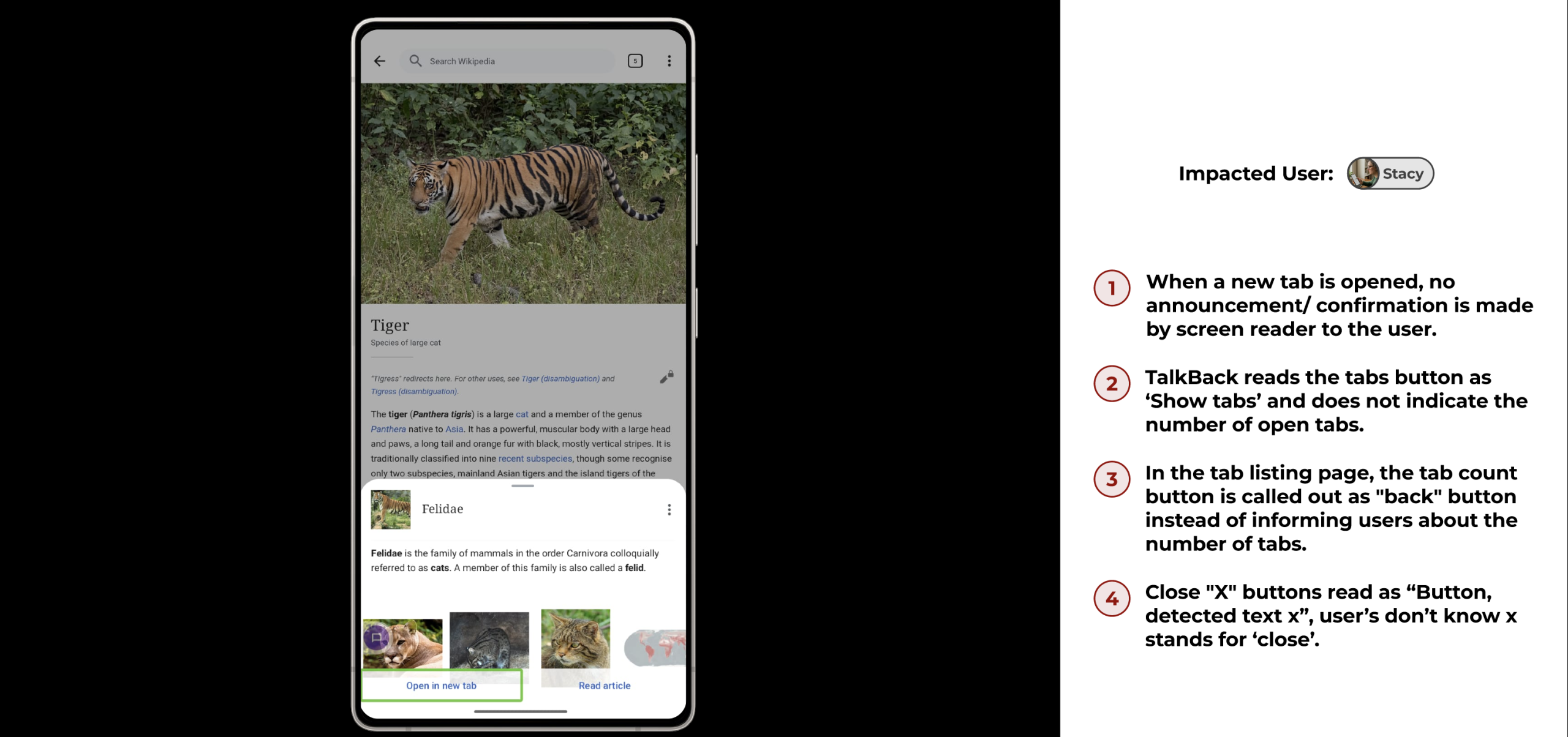
- When a new tab is opened, no announcement/ confirmation is made by the screen reader to the user.
- Violates WCAG 4.1.3 Status Messages, 3.2.2 On Input and M3: Status changes must be announced to screen reader users.
- TalkBack reads the tabs button as ‘Show tabs’ and does not indicate the number of open tabs.
- Violates WCAG 1.3.1 Info and Relationships, 4.1.2 Name, Role, Value and M3: Button labels must convey complete state information.
- In the tab listing page, the tab count button is called out as “back” button instead of informing users about the number of tabs.
- Violates WCAG 4.1.2 Name, Role, Value, 3.2.4 Consistent Identification and M3:Labels must accurately match their function and purpose.
- Close “X” buttons read as “Button, detected text x”, user’s don’t know x stands for ‘close’.
- Violates WCAG 4.1.2 Name, Role, Value, 2.5.3 Label in Name, 2.4.6 Headings and Labels and M3: Action buttons must describe what they do, not their appearance.
Recommendations
- Announce when tab opens: “New tab opened: [Article name]”.
- Label “X” buttons: “Close tab”
- Label tab count button: “[number] tabs open”
- Replace ‘+’ icon with ‘←’ icon.
- Place the ‘+’ next to the tab count button.
Finding #3: Broken Reading Experience
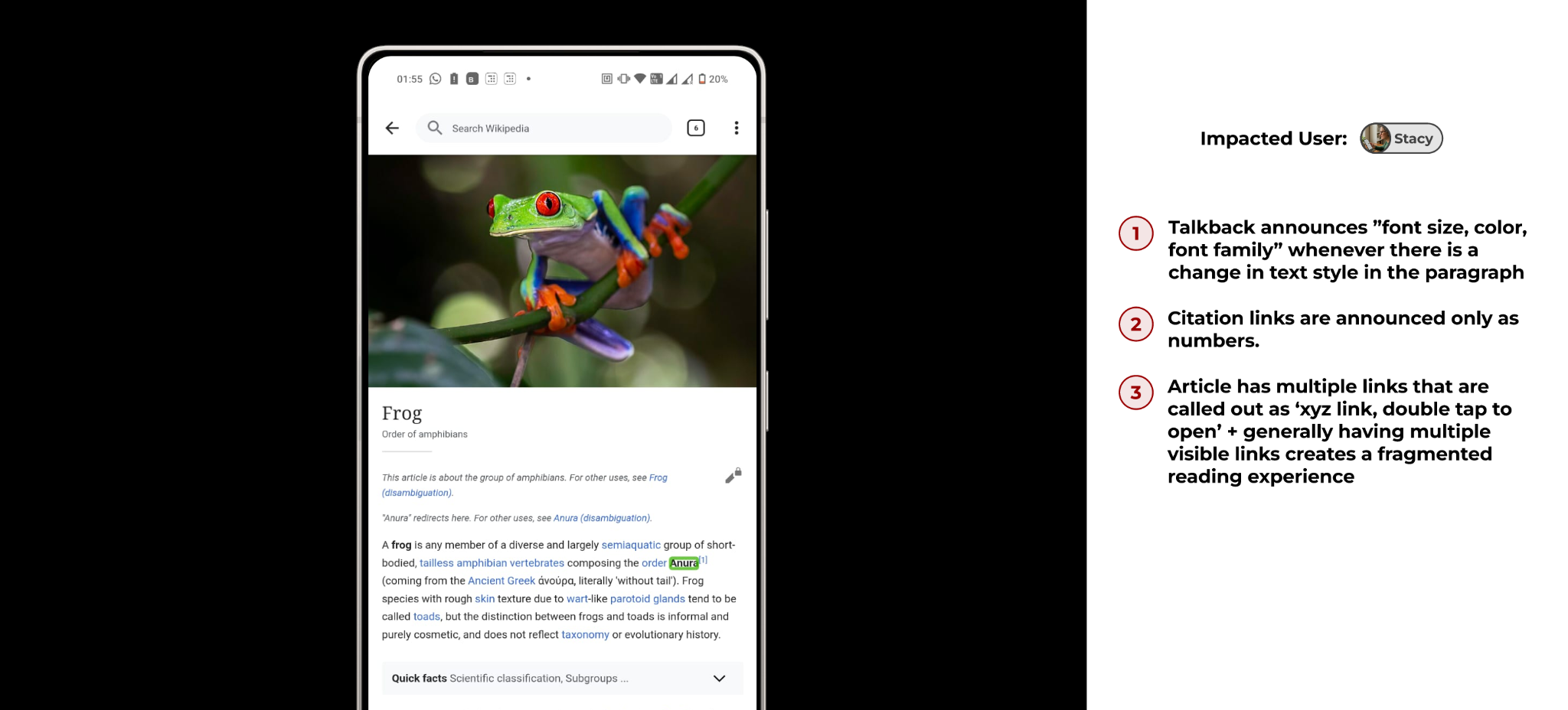
- Talkback announces ”font size, color, font family” whenever there is a change in text style in the paragraph.
- Violates WCAG: 1.3.1 Info and Relationships, 1.3.2 Meaningful Sequence and M3: Visual styling changes should not trigger screen reader announcements.
- Citation links are announced only as numbers.
- Violates WCAG: 2.4.4 Link Purpose (In Context), 4.1.2 Name, Role, Value and M3: Links must have descriptive text explaining their destination
- Article has multiple links that are called out as ‘xyz link, double tap to open’ + generally having multiple visible links creates a fragmented reading experience.
- Violates WCAG: 1.3.2 Meaningful Sequence, 2.4.6 Headings and Labels M3: Excessive interactive elements reduce readability. Should provide simplified reading mode option.
Recommendations
- Remove font metadata announcements.
- Give citation links descriptive names: “Citation 1: Amphibian species of the world”.
- Create “Reading Mode” button or toggle that hides link formatting and metadata.
Finding #4: Search incompatibility with assistive tech
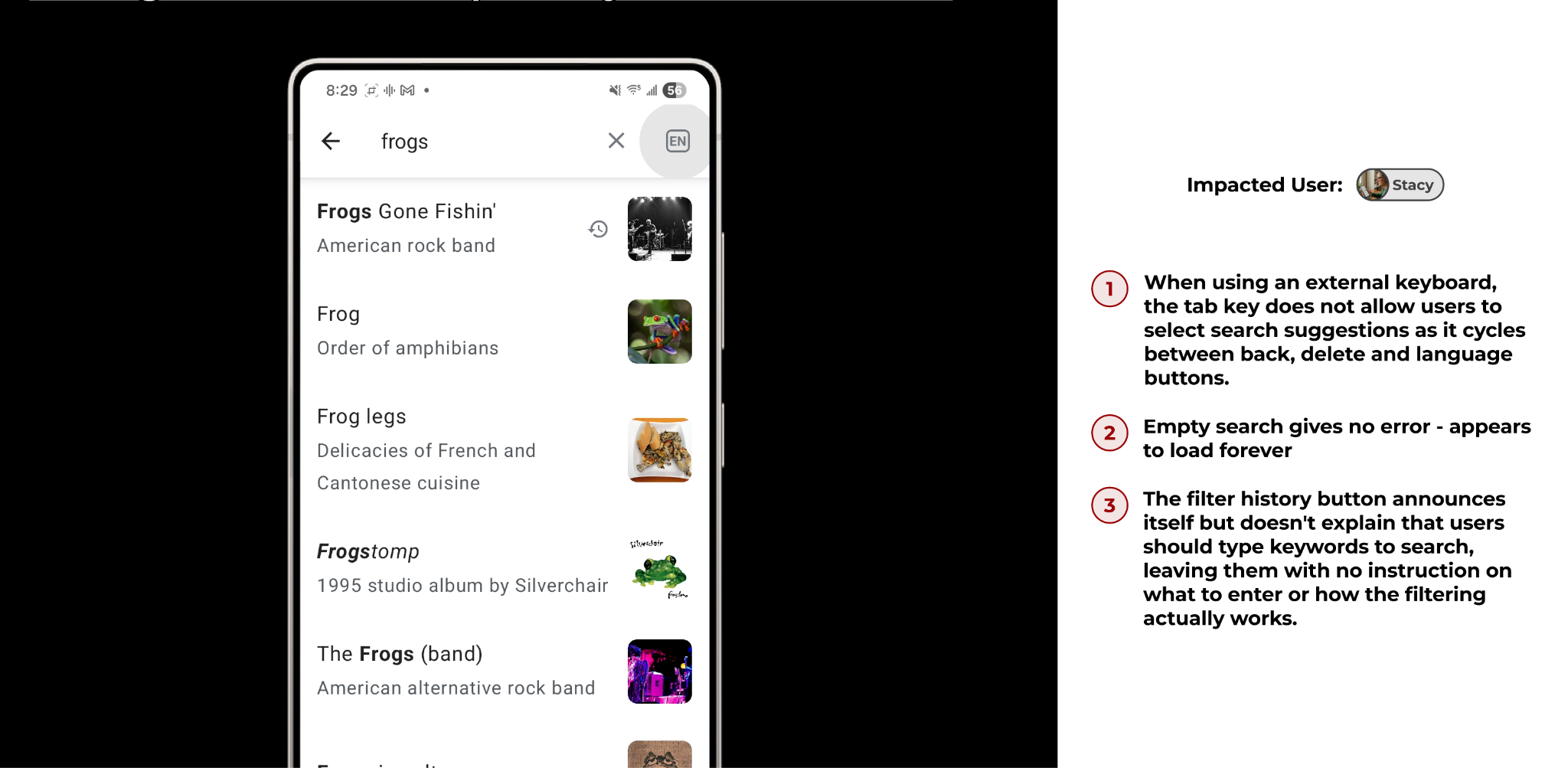
- When using an external keyboard, the tab key does not allow users to select search suggestions as it cycles between back, delete and language buttons.
- Violates WCAG: 2.1.1 Keyboard, 2.4.3 Focus Order and M3: All interactive elements must be reachable via keyboard navigation
- Empty search gives no error – appears to load forever
- WCAG: 3.3.1 Error Identification, 3.3.2 Labels or Instructions and M3: Empty states must provide clear feedback and guidance
- The filter history button announces itself but doesn’t explain that users should type keywords to search, leaving them with no instruction on what to enter or how the filtering actually works.
- WCAG: 3.3.2 Labels or Instructions , 4.1.2 Name, Role, Value and M3: Non-obvious interactions require clear usage instructions
Recommendations
- Enable keyboard Tab/Arrow navigation through search results
- Announce empty search: “Search field is empty. Please enter text”
- Add instruction: “Type to filter search history”
Finding #5: Gallery has no visible position indicator
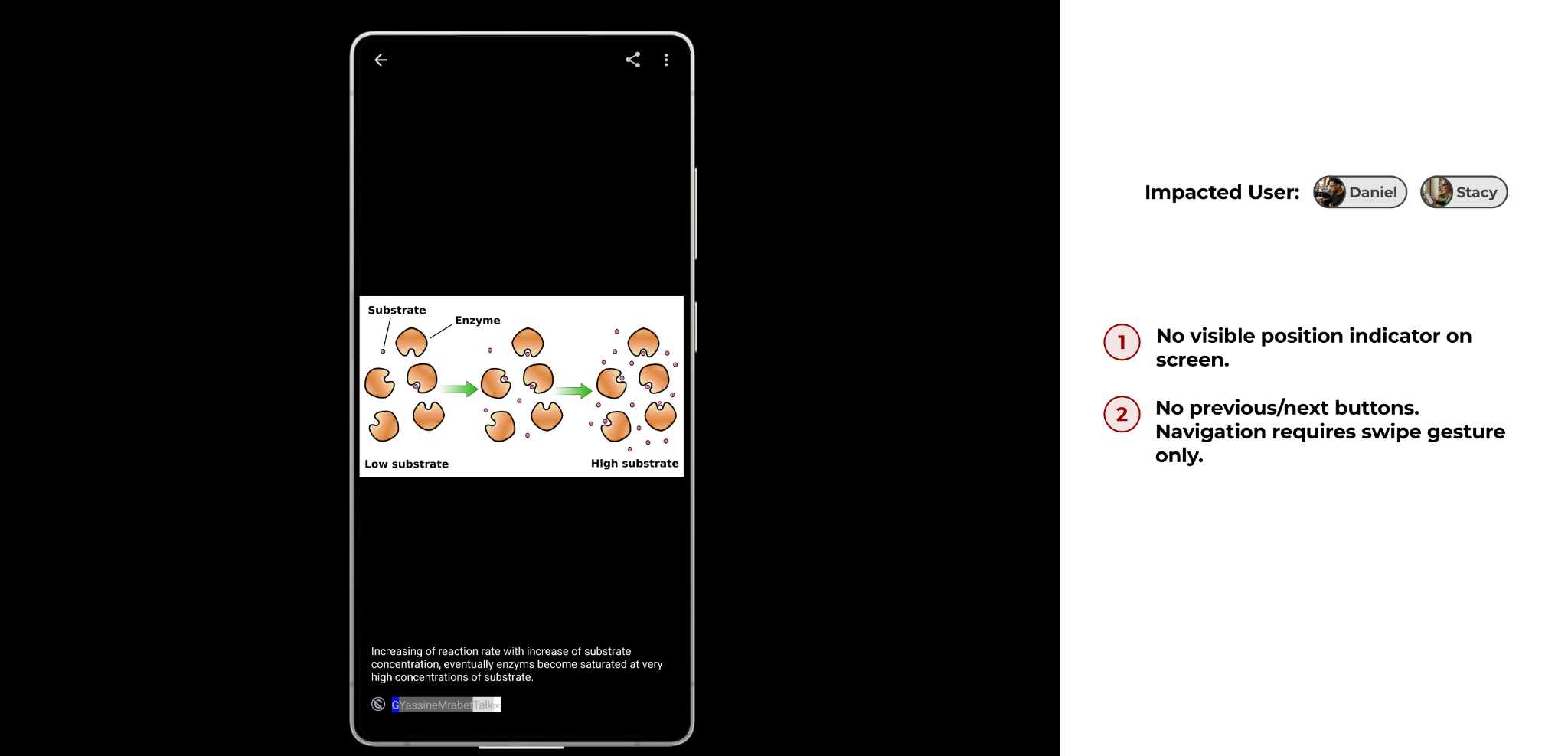
- No visible position indicator on screen.
- Violates WCAG: 2.5.1 Pointer Gestures, 2.1.1 Keyboard and M3: Multi-item carousel views must provide visible position feedback
- No previous/next buttons. Navigation requires swipe gesture only.
- Violates WCAG: 2.5.1 Pointer Gestures, 2.1.1 Keyboard and M3: Gesture-only controls must have single-tap alternatives
Recommendations
- Add visible position indicator and dot navigation.
- Add previous/next buttons for single-tap navigation.
Full List of Tier 1 Findings
Full List of Tier 2 Findings
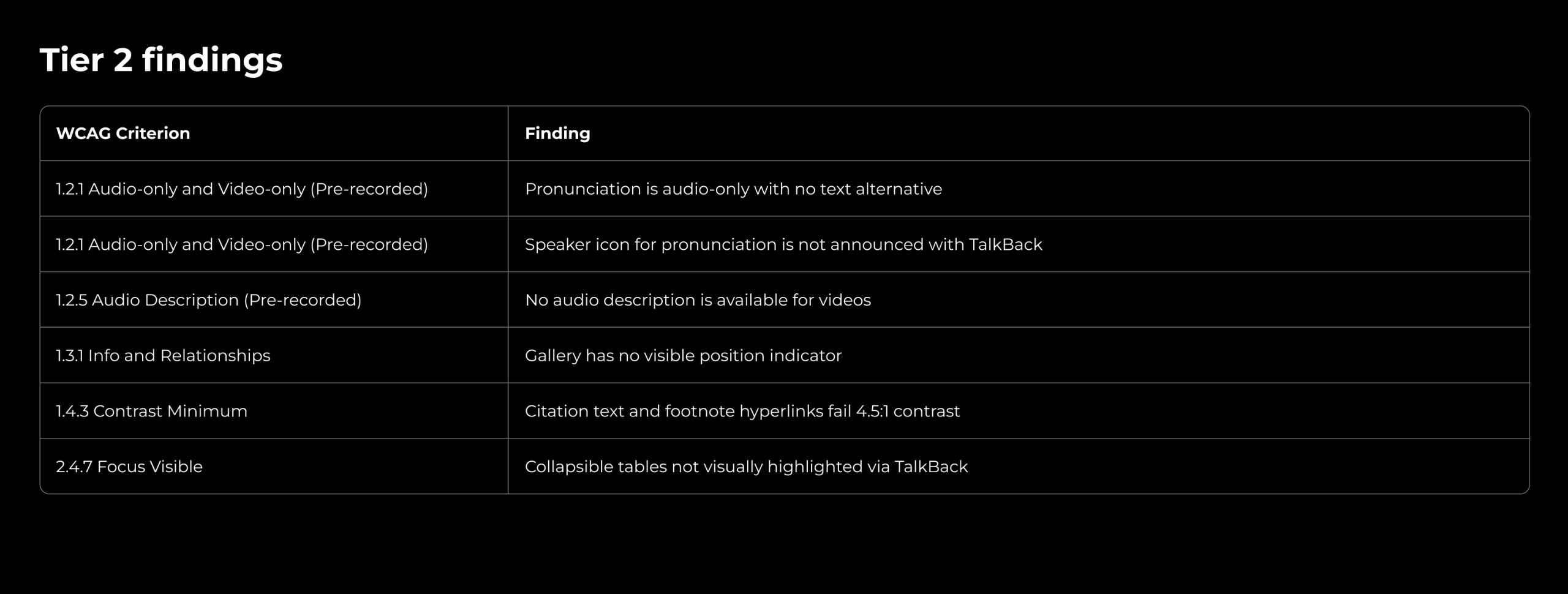
Full List of Tier 3 Findings
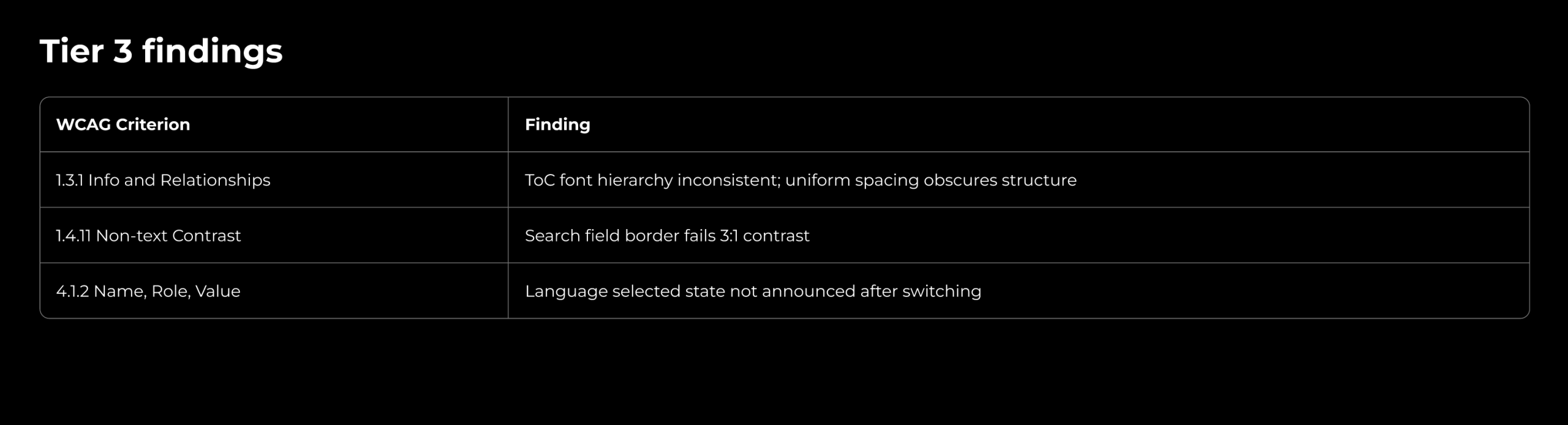
References
Deaf/Hard of Hearing
- Media Market. (2024). Hearing loss statistics. https://media.market.us/hearing-loss-statistics/
- NIH. (2021). Hearing loss prevalence and years lived with disability. https://pmc.ncbi.nlm.nih.gov/articles/PMC8093950/
- AudioEye. Digital accessibility for deaf and hard of hearing users. https://www.audioeye.com/post/digital-accessibility-deaf-hard-of-hearing/
- Scherer & Glueckauf. (2005). Assessing the benefits of assistive technologies. https://www.sciencedirect.com/science/article/abs/pii/S074756320800023X
- Schley et al. Technology use among adults who are deaf and hard of hearing. https://www.academia.edu/7204593
- ACM. Captions and subtitles accessibility. https://dl.acm.org/doi/abs/10.1145/2662253.2662261
- W3C. Making audio and video accessible. https://www.w3.org/WAI/media/av/captions/
Motor / Mobility
- CDC. Disability and health data. https://dhds.cdc.gov/SP?LocationId=59&CategoryId=DISEST
- CDC. Arthritis in Adults Age 18 and older: United States, 2022. https://www.cdc.gov/nchs/products/databriefs/db497.htm#section_1
Cognitive
- Accessibly. Most common disabilities and accessibility. https://accessiblyapp.com
Vision
- Disability and Functioning. National Center for Health Statistics. https://www.cdc.gov/nchs/fastats/disability.htm
Android Accessibility
- Google. Android accessibility features. https://support.google.com/accessibility/android