
Team: Elizabeth Serjantov, Roshni Ganesh, Vasilios Nikolopoulos
Duration: 14 weeks (February – May 2026)
Client: United Nations Digital Library | https://digitallibrary.un.org
Methods: Eye-Tracking Sessions, SUS Questionnaire, RTA
Tools: Figma, Usertesting, Tobii Eye Tracker, Zoom, Google Survey
Abstract
The UN Digital Library (digitallibrary.un.org) is designed to provide global public access to UN documents and knowledge resources. While the platform is intended for broad use by a global citizenry, it often requires specialized knowledge for users to access what they need. As part of ongoing efforts to improve the public-facing interface, the Library team has requested external research and usability testing to evaluate the current Help and Support ecosystem and recommend usability improvements. To uncover and understand the pain points users face within Help & Support Systems, we designed and conducted eye-tracking studies and surveys, and synthesized our findings into three thoughtful usability recommendations. Our key findings were issues with the low understandability of the “Search Tips” tool, the low discoverability of the “Ask Us” widget, and the mismatched mental model of the “Help” section.
The Problem
The United Nations Digital Library is a primary bibliographic database of the United Nations established in 1979. It consists of the official documents and publications produced the UN System. It is managed and developed by the Dag Hammarskjold Library (Wikipedia, 2025 https://en.wikipedia.org/wiki/United_Nations_Digital_Library).
Our team was tasked with focusing on the Help and Support Systems for the digital libraries. Some key systems we focused on were the Help Central page, Live Chat Support, Online Contact Form, and Search Tips tool. During our Kick-Off Meeting with our client, they discussed how they recognized that users had trouble navigating and locating Help and Support tools- it was something that they had noticed on their end as well.
Our primary goal is to study… How users navigate the Help and Support ecosystem on the UN Digital Library, and where friction occurs in their attempts to find help.
Because we want to find out… What users expect when seeking support, and where the breakdown between their intent and the interface occurs.
So that… We can identify what should be changed or simplified to reduce confusion and make help easier to find.
My role was to assist with planning our research objectives and questions, developing eye-tracking scenarios and tasks, recruiting and testing participants, meeting with our stakeholders, and synthesizing findings. I specifically focused on recruiting 2 participants, running our eye-tracking study with them, uncovering a key insight regarding one of the key help systems, and designing an actionable usability recommendation based on this.
My team members were Roshni Ganesh and Vasilios Nikolopoulos, who assisted with similar tasks, and also each uncovered a key usability issue within a help and support system. With my work, we were able to see how we could translate these findings into three re-designs that focused on different help and support systems.
The Process
To solve this problem of discovering specific usability issues, we developed and underwent the research plan below.
Research Plan: (https://docs.google.com/document/d/1Uy4FgnP0yzKZVfmM1d6Vc-Zb7tgfdDpyynUaLM_Ss44/edit?usp=sharing)
Plan: Define Research Objectives and Questions
Our Research Objective was to study how users navigated the Help and Support ecosystem on the UN Digital Library website to understand what users expected when seeking help and support, and where the gap lies between their intent and the interface. This focus would help us identify what is currently working, and what should be reimagined or simplified to reduce confusion and make support easier to find.
Our Research Questions were:
- What do users expect when seeking help on the UN Digital Library?
- How visible and understandable are the Help pathways? (Focus: Chat, Search Tips, Contact and Help)
- What information matters most to users when they seek help?
We then developed an Interview Protocol for our Eye-Tracking Studies that framed questions in a way that would need users to locate and interact with specific Help and Support tools.
Design Eye-Tracking Study
We chose eye-tracking as our primary research method because it helped us answer our primary research focus- where do users expect to find help and support, what information matters most, and how visible are the Help and Support systems to users? Eye-tracking sessions would yield gaze plots and heat maps that reveal how users interact with the site and where they look first/the most.
Tasks and Scenarios: (https://docs.google.com/document/d/1p-r539ZblP-5lMGGKnRD36Pr-_1JZayoVGUz-09XWTI/edit?usp=sharing)
Scenario: You work for an NGO and need to find the “Universal Declaration of Human Rights” and you’ve never used the UN Digital Library before
Task 1: Search Guidance
You’re unsure which result is correct. Find any guidance on the site that helps you search better. (Success Criteria Eye-Tracking Focus: Finds Search Tips independently (or) Use Help on Navigation First fixation point; path from search bar)
Task 2: Live Help
The document isn’t available in Arabic. Find a way to contact a librarian right now. (Success Criteria Eye-Tracking Focus: Locates and opens the Chat bot (Ask Me) Time to find chat; fixation on widget)
Task 3: When Chat Fails
The chat is offline. Find out when it’s back, then find another way to send your question. (Success Criteria Eye-Tracking Focus: Reads chat hours → submits contact form Navigation path after chat failure)
Participants Demographics:
- 6 Participants (each of us recruited 2 participants)
- Age Median: 25-44
- Majority (4/6) used a Digital Library website once a week or month
Screener Survey and Consent Form: (https://docs.google.com/document/d/1kbFbhvrM7pppJNrHQroLVc8gnwdJb28hoqypFx_sRsg/edit?usp=sharing)
The Results
Synthesize Key Findings supported by Eye-Tracking Evidence
What was Working?
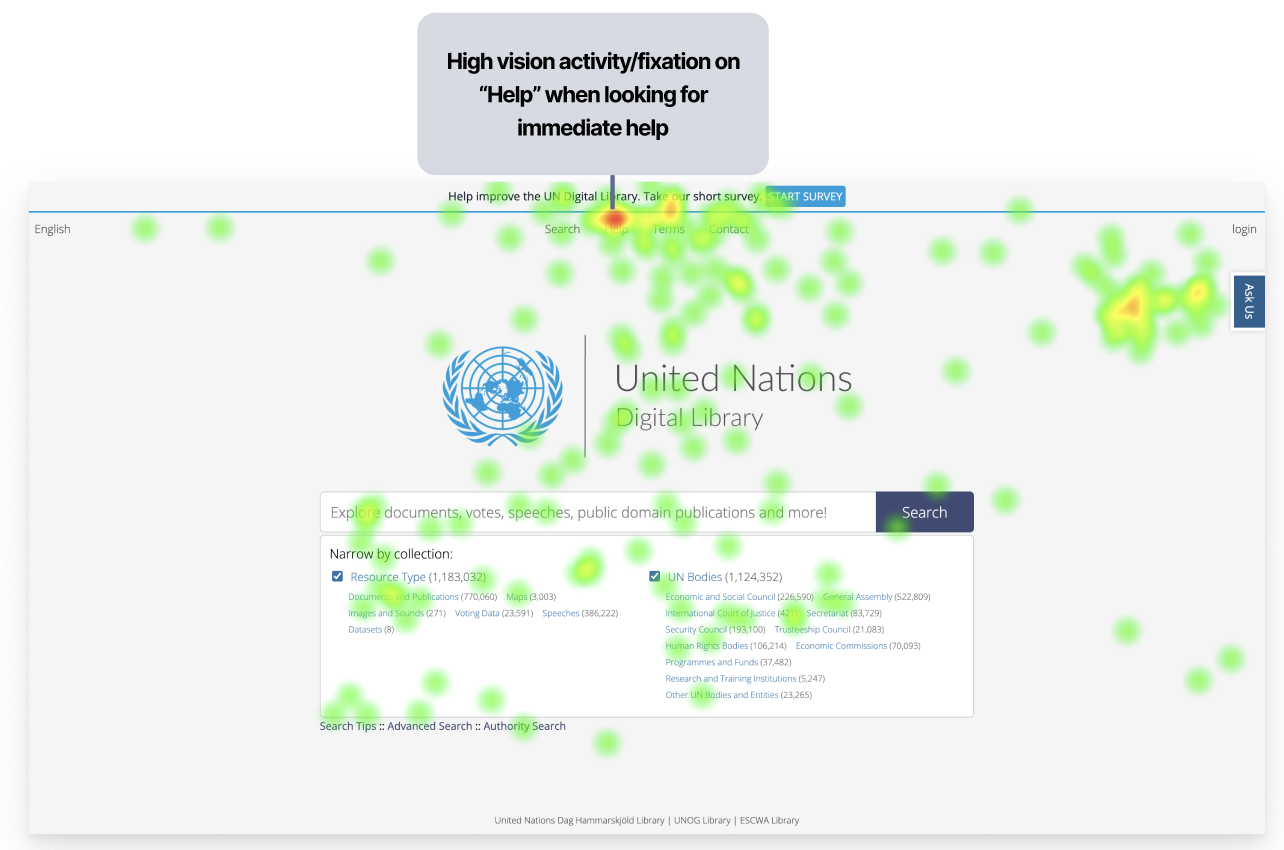
During my Eye-Tracking sessions, 2/2 of my participants recognized the “Help” label in the Main Navigation. They trusted it as the most reliable source of relevant information, alongside the “Ask Us” label, which directed participants to the Live Chat feature. My team members found similar insights, and we agreed it worked well on the site.
We recognized this in our Static Heat Map of the Homepage:
Another feature that worked well on the site was locating the Contact Form, which users could use to submit questions to a librarian when the Live Chat feature was offline. Once again, 2/2 of my participants were able to locate this feature and explain in detail how it could help them answer a question. A quote from Participant 4 expressed: “I knew exactly where to go once it said the Chat was offline. Once you clicked ‘Ask Us,’ you were presented with two options- and the Contact Form was clearly the next step you would take.”
The last feature we recognized that was working well was the content in the “Help” section and the “Search Tips” tool. Users appreciated the amount of information available on these pages. Unfortunately, 0/2 of my participants were able to locate the Search Tips tool (a key finding I dive into later), and 0/2 used the Help page to improve their searches. My team members found that their participants found the information useful for independent searching.
I learned that, as much as we focus on what is not working, it is important to share with the client what is going well on the site, because it’s not great to hear only negative feedback, but it’s also good to know where no edits are needed. Recognizing what was working also helped me learn how we can draw inspiration from these designs and incorporate them into our redesigns to ensure the brand remains consistent while also aligning with what users recognize and expect.
SUS Questionnaire (System Usability Scale)
Within our research process we asked our participants to complete a post-test questionnaire containing 10 different questions with a 5-point Likert scale that helps evaluate the usability and learnability of a system.
The SUS Score of the United Nations Digital Library Help and Support Systems was 39.6, with a benchmark score of 68.
SUS Score Calculator: (https://docs.google.com/spreadsheets/d/1v3xPA2Dwj9C8zhCyZZw0dsz2AvnwDkqFHc3_Lgi2w18/edit?usp=sharing)
SUS Survey: (https://docs.google.com/forms/d/17Stqd24S24BXUAAo2E4hpw3314TJHg83Bg9C936oC3Y/preview?edit_requested=true)
SUS Responses: (https://docs.google.com/spreadsheets/d/1D_zXAthY6AhyUf_kAn_ZKuP5hKPLcSFEDjHW8uZ5byw/edit?gid=954979312#gid=954979312)
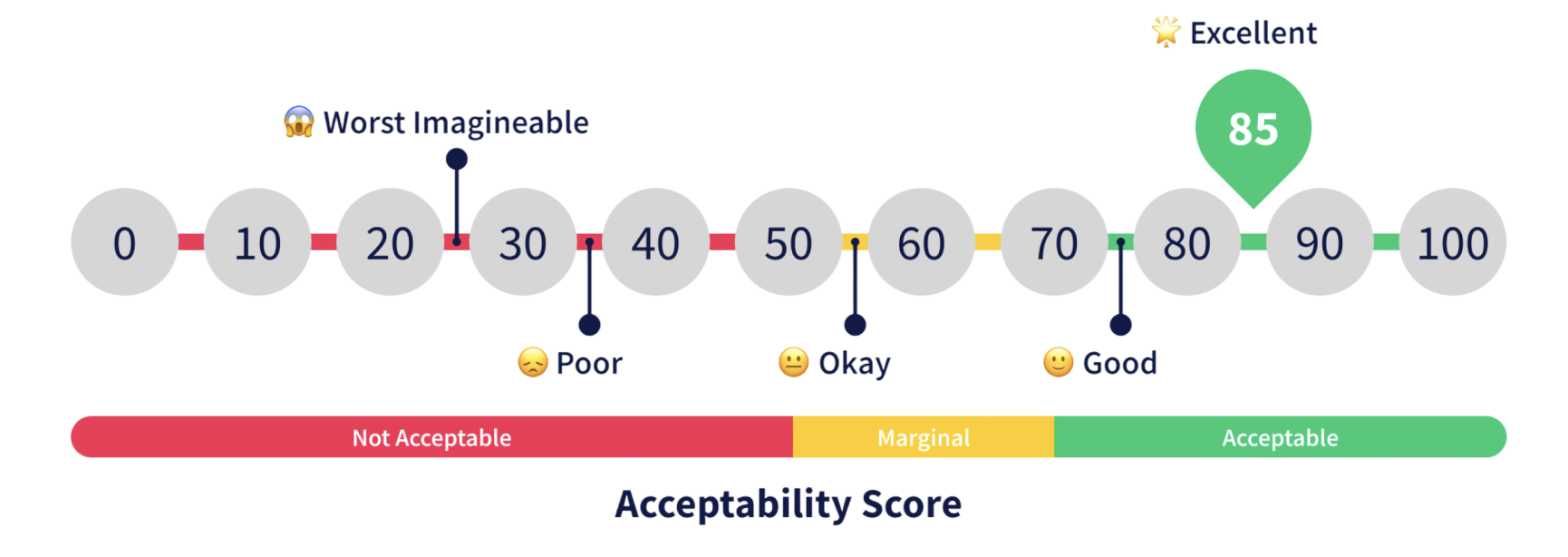
The UN Digital Library site had “Poor,” scoring, based on what our participants had input. The results of this survey validate our hypothesis that there were many usability and learnability issues within the Help and Support Systems.
Our Key Findings
Each person in our team focused on one help and support feature that had a usability issue uncovered by our individual eye-tracking sessions.
From my eye-tracking sessions, there was one task where I felt strongly that my participants struggled the most on: “You’re unsure which result is correct. Find any guidance on the site that helps you search better. (Success Criteria Eye-Tracking Focus Finds Search Tips independently (or) Use Help on Navigation First fixation point; path from search bar).”
0/2 of my participants located the Search Tips tool, and when I asked them about this, 0/2 of them even realized that this tool was accessible.
A direct quote from one of participants (P4): “I did not see that at all [the Search Tips].”
This was highly concerning because the Search Tips tool is a crucial part of the UN Digital Libraries’ Help and Support System. It helps users refine their searches to locate specific documents, greatly reducing the time they spend finding them.
This brings us to our first finding: The Search Tips is very hard to locate or mostly invisible to users. I focused directly on this finding, and developed a potential A/B Test (https://www.figma.com/deck/jNcys0vCnx7iDYtbdmmBeW) to further validate this usability issue.
My team members focused on the next two findings:
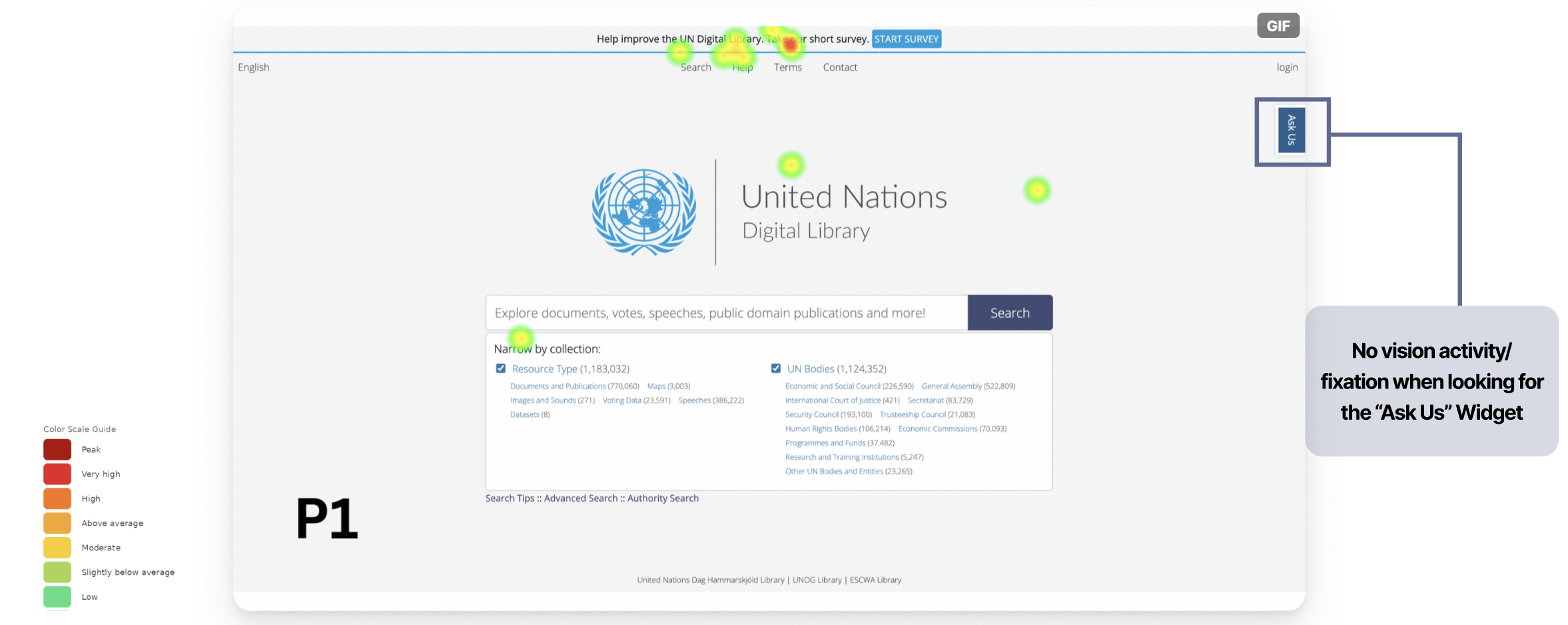
2. The “Ask Us” widget was not immediately discoverable, requiring users to actively search for it rather than naturally noticing it
3. Users’ Mental Model of what information “Help” on Top Nav should contain did not match the existing information present
To view each of our participants responses to each task, and recognize patterns in usability issues, we created a Rainbow Sheet, linked here: https://docs.google.com/spreadsheets/d/1kYAst_mCb2FNu5RjzqQa0hbhVZknzq_O4bNwqAExeBs/edit?gid=4#gid=4 .
Recommend Actionable Usability Improvements
Finding 1: The Search Tips is very hard to locate or mostly invisible to users.
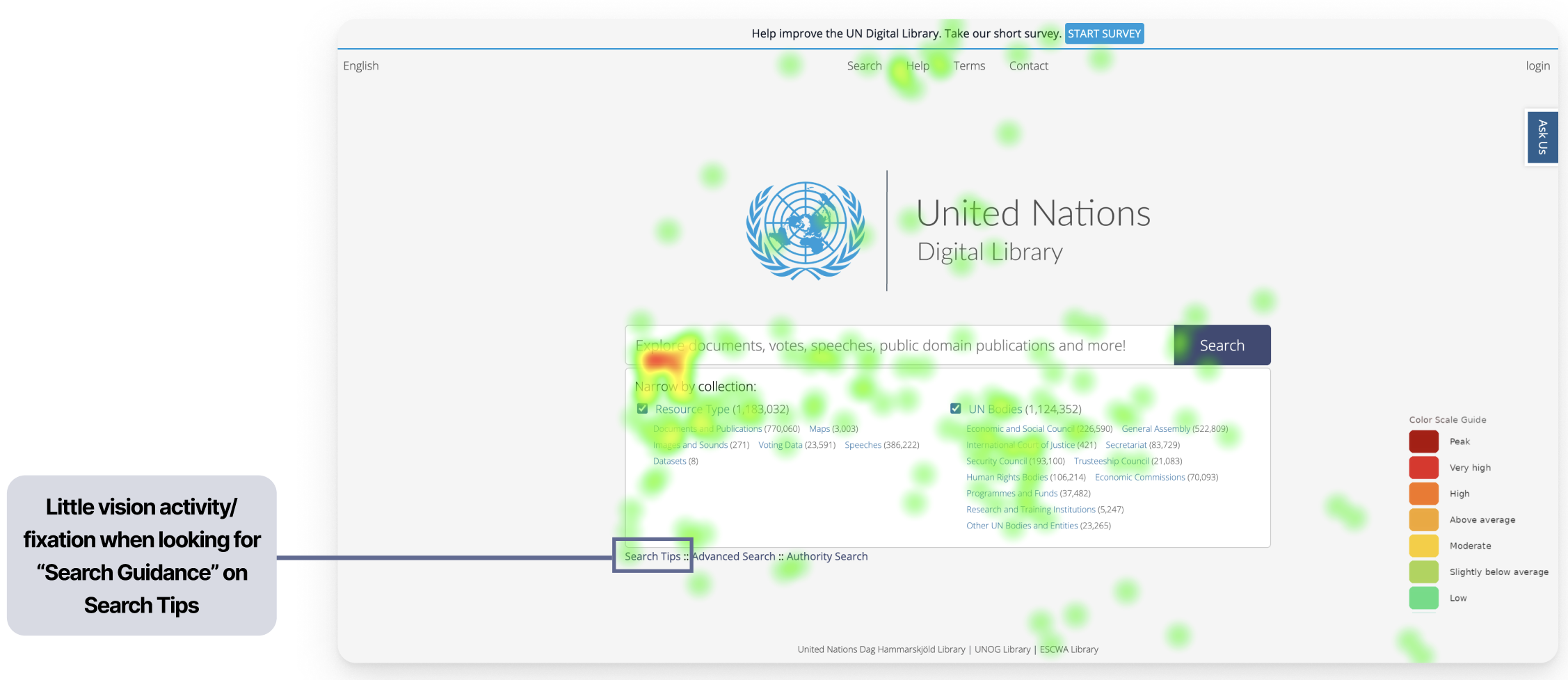
Supporting Claim 1: 0/6 participants found the Search Tips on the first go for the intended task and expected it to be somewhere closer to the “Search Bar”
A direct quote from one of my participants: “No… I did not realize that was there. Why did they put it in such a small font? I would have never noticed- it looks like it’s not important.” (P4)
We can see evidence of this low visibility in this Static Heat Map below.
Supporting Claim 2: 0/6 Participants did not understand how Search Tips was different from Advanced Search and how it could help them
A direct quote from one of my participants: “I saw a lot of different filtering options- I guess I could use Advanced Search for this task (referring to a task that was supposed to have them locate and use the Search Tips)” (P1). Along with this quote and others, my team members found that it showed clear confusion about which resources were available to users locating documents, and what the different tools do.
Recommendation 1:
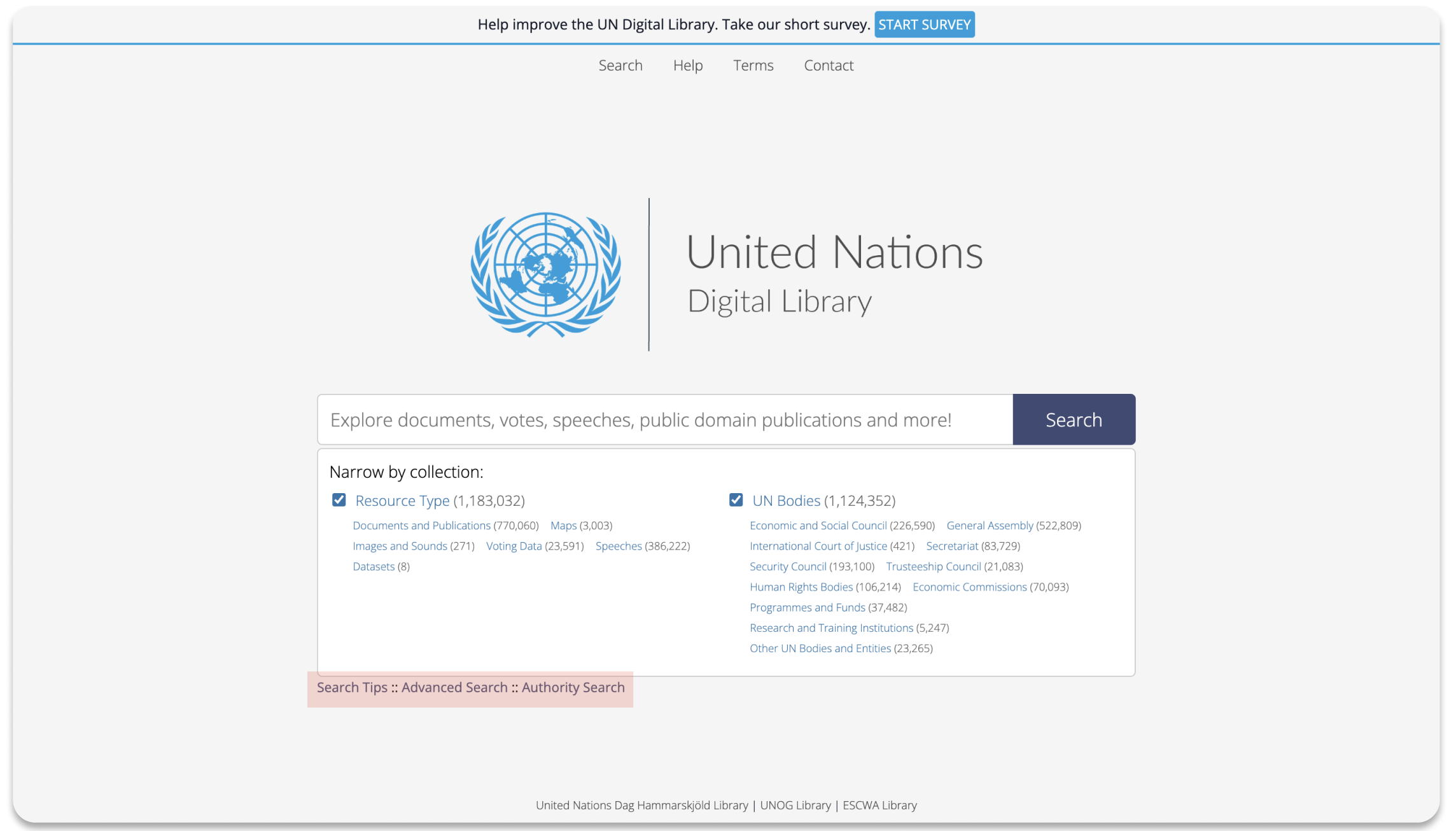
Current State of the UN Digital Library Homepage:
Proposed Redesign:
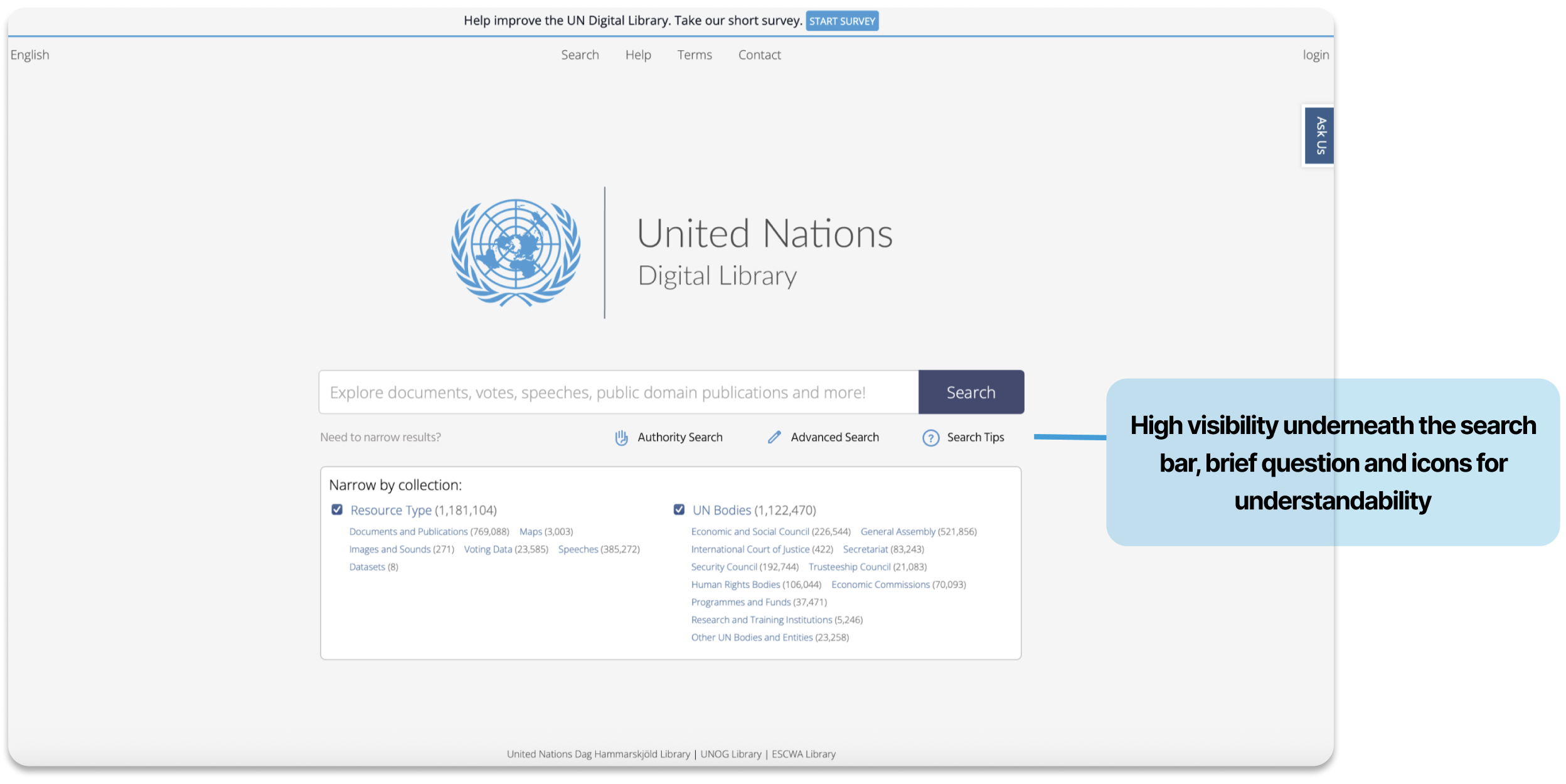
It provides feedback when a user hovers over it by changing color, and, along with its placement directly under the spacebar, it also features a “question mark” icon that is intuitive for users to understand that it is a resource to help them. This way, users can locate a very important resource in the Help & Support Systems and understand that it will help them filter/narrow their Search.
By focusing on this finding, I learned that it was difficult to assess the understandability of the Search Tips tool because none of my participants, or my teammates’ participants, was able to locate or view the Search Tips page. However, I determined that, even though users did not directly view the Search Tips, they did not understand what it was because of its extremely low visibility. Users assumed it was not important; therefore, the location and appearance of this directly influenced its understandability. Therefore, I learned that, with this redesign, users can now discover and understand that Search Tips is a valuable Help and Support tool, thanks to its new location, size, color, and icon, which match what the user expects to see when seeking help with searching.
Finding 2: The “Ask Us” widget was not immediately discoverable, requiring users to actively search for it rather than naturally noticing it.
Supporting Claim 1: 4/6 participants took an average of 17.25 secs to Find the “Ask Us” Widget. 1 participant took >1min to Find the “Ask Us” Widget. 1 participant did not notice the widget at all.
We can see this in the Heat Map my team member collected below from one of my participants (P1):
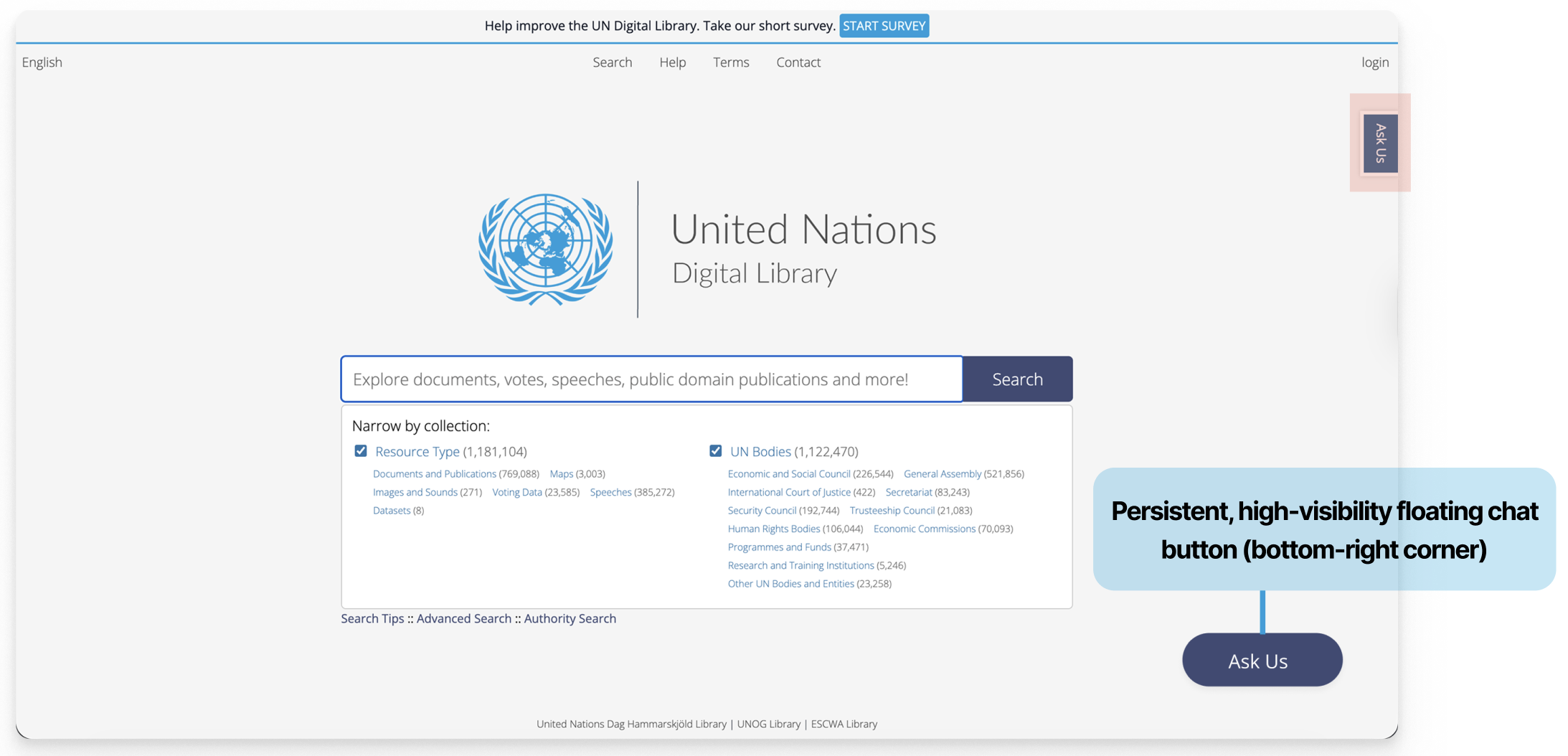
Recommendation 2:
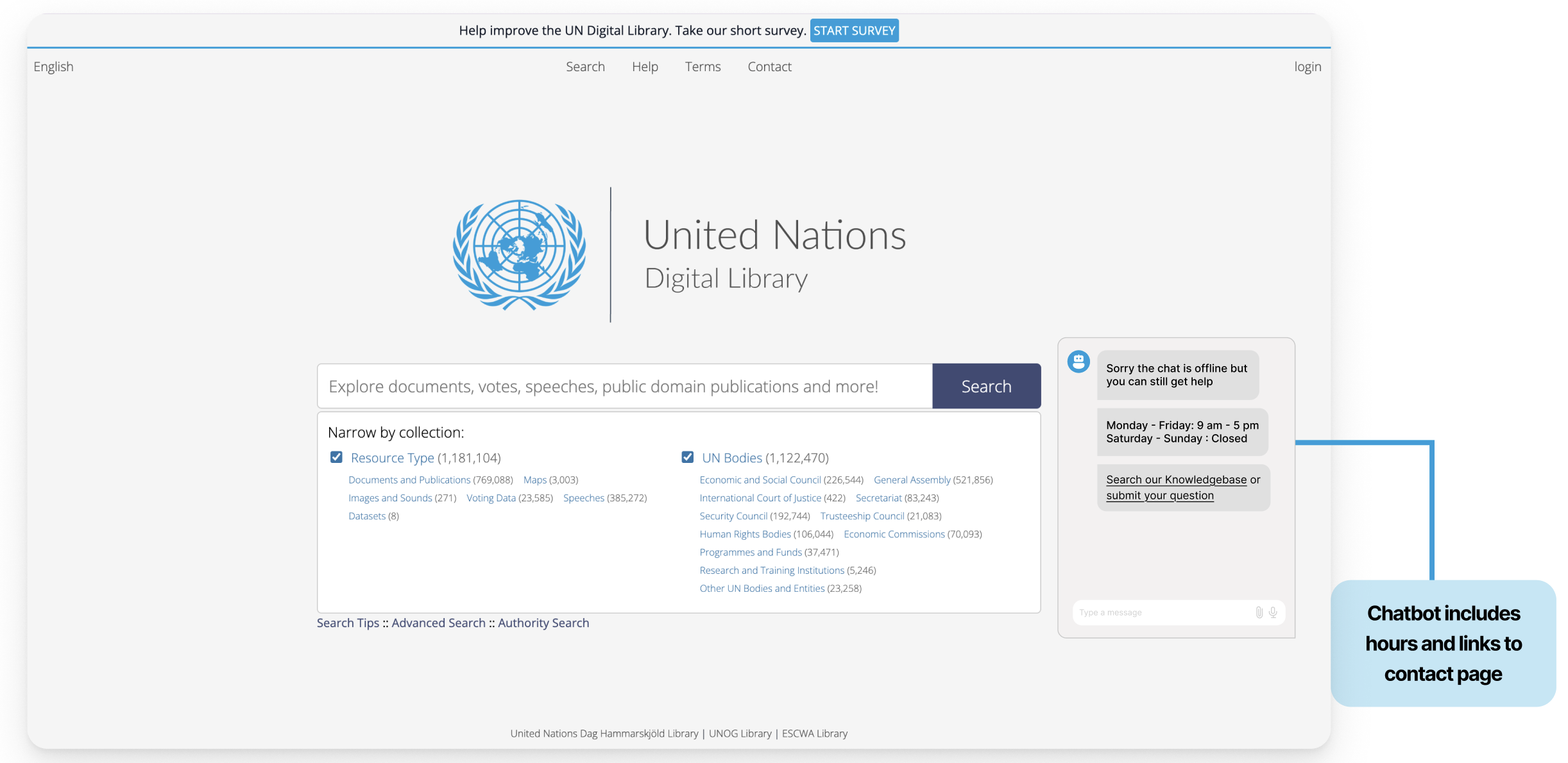
Supporting Claim 2: Participants were confused by the Chat Online Hours, as the posted opening hours on the “Contact Form Page” referred to the Library overall rather than the chat service specifically. 1/2 of my participants struggled to locate the Chat Hours, and when they did, they still were not certain it was the correct information.
A direct quote from one of my participants: ” [Locating the Online Chat Hours when the chat was offline] . . . Made me feel discouraged.” (P1)
Recommendation 2.2:
Finding 3: Users’ Mental Model of what information “Help” on Top Nav should contain did not match the existing information present
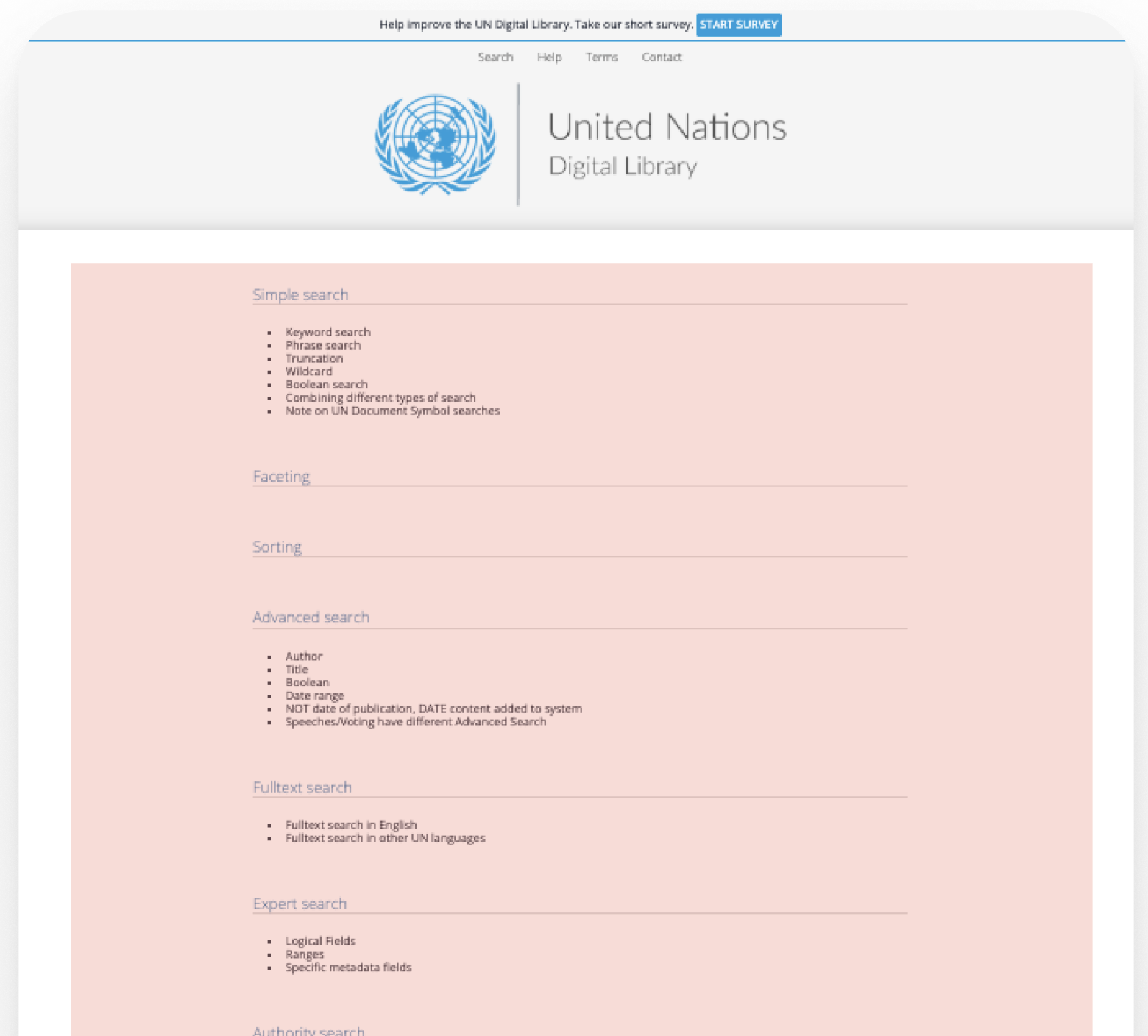
4/6 of our participants expressed confusion when navigating the “Help,” page, although 6/6 located this resource. Some evidence of this was direct quotes from both of my participants:
“Yes I noticed help, but it was not that helpful.” (P4)
“Options to contact, help with finding documents. It was not what I expected.” (P1)
Recommendation 3:
Current Help Page on UN Digital Library Site:
Proposed Redesign:
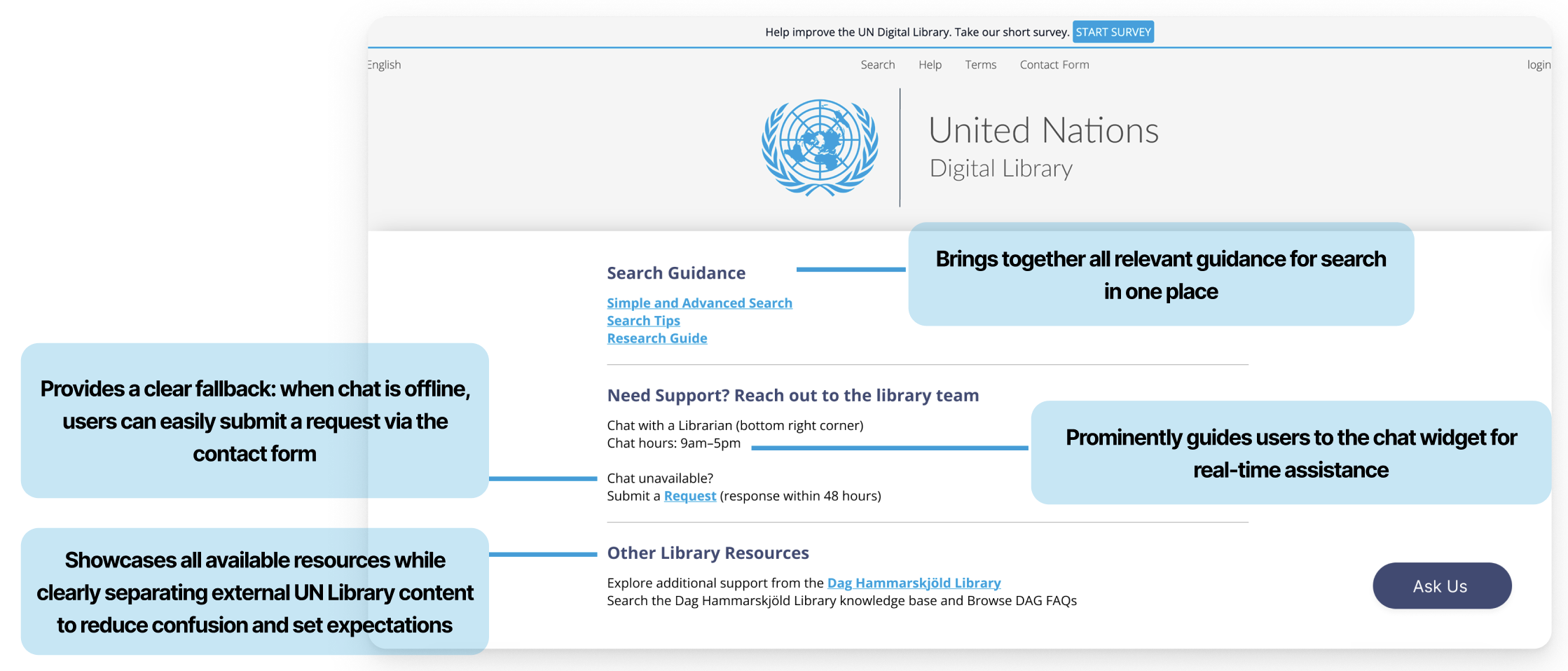
From analyzing our findings and designing recommendations, I learned that there is a lot of intuitive design that you can only uncover through user interviews. We collected a lot of quantitative data, but the direct quotes and recommendations from our participants were crucial for redesign. Their feedback on these resources gave me a good idea of what they expected to see. Therefore, I learned that asking users for input in your post-test questions is crucial to designing systems that reduce their mental load.
The Conclusion
Once we completed our research and developed our design recommendations, we put together a final presentation in a slide deck to share our findings and proposed redesigns with our clients. Our clients were very impressed with our research and recommendations; the only questions they had were regarding the specific tasks we had users complete in our eye-tracking sessions. We made sure to include these scenarios and tasks in our follow-up email to our client, where we sent them all of our final deliverables. I curated this email personally and ensured it included all the correct files.
If my team and I were going to take the next steps, we could conduct the A/B Testing Proposals we each created. This way, we could validate our redesigns or edit them based on the feedback and metrics we receive. Another step I would take would be to reflect on the Problem List we created and highlight the problems we did not redesign. I would go down the list, choose the next problem we did not redesign, and develop solutions for those issues as well. This way, we can address more usability issues we uncovered during our testing sessions. The final step I would take is to receive feedback on how our redesigns were doing once they were integrated into the site. With proper feedback and more testing, we could refine our designs and continue to improve, as there is always room to grow.
Working within my team at the United Nations Digital Library was truly an amazing experience. I learned a lot about what it means to work within a team and how to understand the diverse users of the United Nations Digital Library website. It was a challenge to create an interview protocol that focused directly on the Help and Support Systems. However, through group collaboration and extensive editing, we successfully developed a testing protocol that helped us uncover crucial areas of the help and support systems that needed immediate attention. Overall, I learned how important it is to work together to recognize patterns and develop actionable solutions.